Week 14 ~ April 28, 2019
I spend a few hours today implementing the changes I talked about in my demo. I also realized that it is an issue if the next song plays before the lights finish executing. Technically the lights are still programmed to the audio file; however, what good is that if the user has to act in a certain way to get those results. So I implemented a timer that takes the mod of the audio readers position/3 and then waits that long. Everything is now working as expected except for in the add song view you still have to click on the box after using the file search.
Presentation-wise, definitely not one of my strengths. At work, all the presentations I give are over webex or if in person with a group of < 4. So this was my first in large group in-person presentation in since CSCI 225, so it went ok, keeping that in mind. I do think the slideshow itself was good though.
I spend a few hours today implementing the changes I talked about in my demo. I also realized that it is an issue if the next song plays before the lights finish executing. Technically the lights are still programmed to the audio file; however, what good is that if the user has to act in a certain way to get those results. So I implemented a timer that takes the mod of the audio readers position/3 and then waits that long. Everything is now working as expected except for in the add song view you still have to click on the box after using the file search.
Presentation-wise, definitely not one of my strengths. At work, all the presentations I give are over webex or if in person with a group of < 4. So this was my first in large group in-person presentation in since CSCI 225, so it went ok, keeping that in mind. I do think the slideshow itself was good though.
Week 13 ~ April 21, 2019
I'm pretty much done with the app I just have some minor features to finish up. Hopefully, all coding will be complete on Tuesday. It doesn't look like I will have time to fix the issue with the navigation back to the search menu from the player. I plan on just pausing the application on navigation back.
I'm pretty much done with the app I just have some minor features to finish up. Hopefully, all coding will be complete on Tuesday. It doesn't look like I will have time to fix the issue with the navigation back to the search menu from the player. I plan on just pausing the application on navigation back.
Week 12 ~ April 14,2019
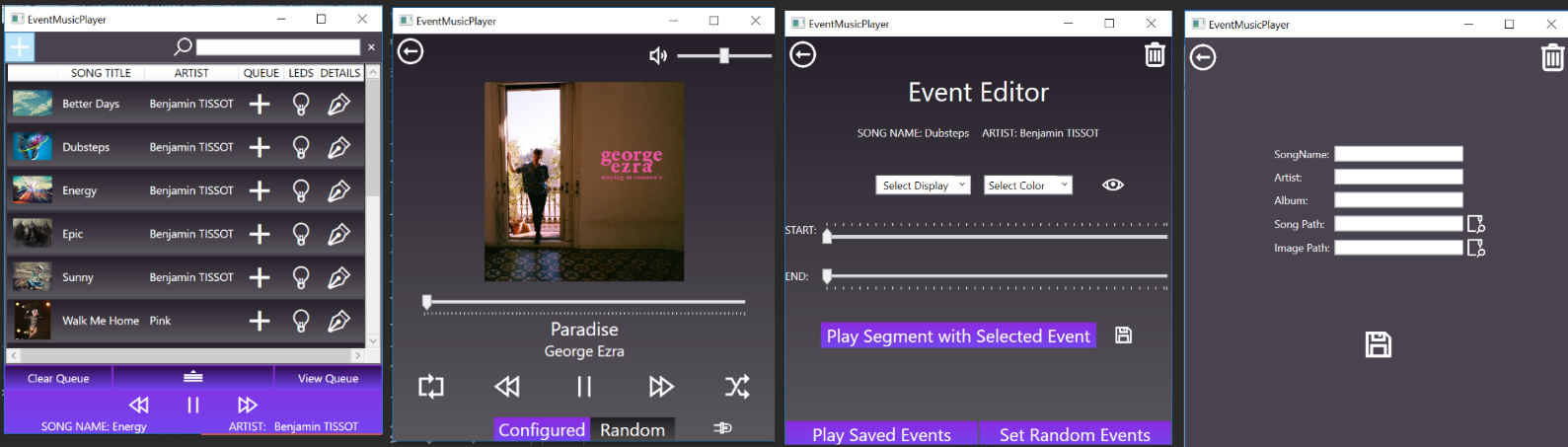
I'm a few steps closer to being done. Last week I set up the song queue as well as got the LEDs to work. This week I'm going to figure out how to control what the is Arduino executing from C#. It should end up being extremely similar tohttps://www.youtube.com/watch?v=m0u5PXrHK8o.
I'm a few steps closer to being done. Last week I set up the song queue as well as got the LEDs to work. This week I'm going to figure out how to control what the is Arduino executing from C#. It should end up being extremely similar tohttps://www.youtube.com/watch?v=m0u5PXrHK8o.
Week 11 ~ April 7,2019
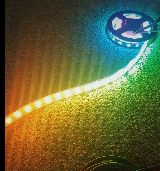
This week I hooked up the LEDs to the Arduino. The lights in my apartment only flickered a few times so I'd say it was a success. I started by watching a video on breadboards. Initially I had issues getting the LEDs to light up, I figured power wasn't hitting them so I check the volts on the wires in the breadboard, but everything appeared fine. It turns out nothing was wrong with the setup rather it was that the LEDs only light up when data is sent to them. I discovered this by sending a small zap to the LEDs through the data plug. I saw one LED flash so I'm going to assume they will all work.
As far as displaying the lights goes, I decided to build an infinity mirror to display the LEDs. It's not complete yet, but should be sometime next weekend as long as the lights are working properly. I will be trying to get the lights to light up via code early this week so if I run into any issues I have plenty of time to ask for help.
----------------------------------------------------------------------------------------------------------
App wise I am almost done. I have a handful of things to still do. Currently the music displays a popup every blank number of seconds. It is calculated by taking the total seconds of the timer dividing it by the number of seconds that an event runs for (ex: 5). Then taking the floor of that value and that gives the array spot of the corresponding event. Right now a popup shows every 5 seconds and then disappears. After I get the lights functions set up I will simply change the popup call to a function call for the lights.
Issues:
The app still restarts the song when navigating to the "search" tab and the volume bar doesn't have two way binding yet so it resets the visual spot of the slider on navigation back to the "player" tab.
Things left to do on music player:
I also have not implemented the new way I will be doing the song queue yet and need to save events and play them back. The variables for events are already set I just need to put them in an array when the "set event" is clicked. These all are fairly minor things. I know how I will be doing all of them just haven't gotten around to doing it.
This week I hooked up the LEDs to the Arduino. The lights in my apartment only flickered a few times so I'd say it was a success. I started by watching a video on breadboards. Initially I had issues getting the LEDs to light up, I figured power wasn't hitting them so I check the volts on the wires in the breadboard, but everything appeared fine. It turns out nothing was wrong with the setup rather it was that the LEDs only light up when data is sent to them. I discovered this by sending a small zap to the LEDs through the data plug. I saw one LED flash so I'm going to assume they will all work.
As far as displaying the lights goes, I decided to build an infinity mirror to display the LEDs. It's not complete yet, but should be sometime next weekend as long as the lights are working properly. I will be trying to get the lights to light up via code early this week so if I run into any issues I have plenty of time to ask for help.
----------------------------------------------------------------------------------------------------------
App wise I am almost done. I have a handful of things to still do. Currently the music displays a popup every blank number of seconds. It is calculated by taking the total seconds of the timer dividing it by the number of seconds that an event runs for (ex: 5). Then taking the floor of that value and that gives the array spot of the corresponding event. Right now a popup shows every 5 seconds and then disappears. After I get the lights functions set up I will simply change the popup call to a function call for the lights.
Issues:
The app still restarts the song when navigating to the "search" tab and the volume bar doesn't have two way binding yet so it resets the visual spot of the slider on navigation back to the "player" tab.
Things left to do on music player:
I also have not implemented the new way I will be doing the song queue yet and need to save events and play them back. The variables for events are already set I just need to put them in an array when the "set event" is clicked. These all are fairly minor things. I know how I will be doing all of them just haven't gotten around to doing it.
Week 10 ~ April 2,2019
I finished implementing the 'session variables' to avoid a song playing on top of another song. The one issue I'm facing is when i navigate away it start the song over. When navigating back to the music player display it acts as expected. I will be using the debugger at some point to figure out why this is happening, but its not crazy high on my priority list as I'm assuming its something minor. I've also decided to put the spectrum analyzer on hold until after all project requirements are completed. It a will require a good chunk of time and I want to avoid simply using one someone else has created.
I finished implementing the 'session variables' to avoid a song playing on top of another song. The one issue I'm facing is when i navigate away it start the song over. When navigating back to the music player display it acts as expected. I will be using the debugger at some point to figure out why this is happening, but its not crazy high on my priority list as I'm assuming its something minor. I've also decided to put the spectrum analyzer on hold until after all project requirements are completed. It a will require a good chunk of time and I want to avoid simply using one someone else has created.
|
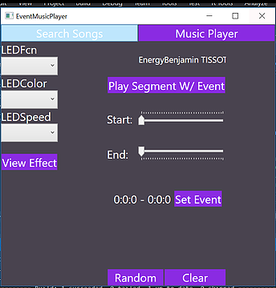
***Updated Screenshot of the Event Editing (not directly related to journal entry above)
|
Week 10 ~ March 31,2019
Exciting week coming up the Arduino came in and I will be picking it up on Monday morning. This week will be project focused. I will be setting up the Arduino and attempting to manipulate the lights via function calls. Last week the demos ended up being very helpful. I wasn't sure how to display the editing screen for the led events and the group had some great ideas. This week I plan on doing a 'capstone marathon.' Tuesday and Wednesday will be spent attempting to finish up the music editing view as well as the music player functionality. Thursday and Friday I plan on setting up the Arduino. Hopefully by Saturday it will be working at the most basic level. The goal is to have a set of temporary functions that each do a super simple light manipulation. Each one will flash a separate color that way when I program it to the music I know if the right function is being called. This will mean at the most basic level all requirements for the capstone should be complete on Sunday the 7th.
Depending how the weekend goes I might be setting up a time to meet with Dr. Pankratz not this week, but early next week after I have had some time to play around with the Arduino to go over how I set it up and discuss any issues I might be facing. It might also be a good idea to meet with Dr. McVey on Thursday the 11th to ensure that all requirements have been meet and see if she is able to break my program.
Exciting week coming up the Arduino came in and I will be picking it up on Monday morning. This week will be project focused. I will be setting up the Arduino and attempting to manipulate the lights via function calls. Last week the demos ended up being very helpful. I wasn't sure how to display the editing screen for the led events and the group had some great ideas. This week I plan on doing a 'capstone marathon.' Tuesday and Wednesday will be spent attempting to finish up the music editing view as well as the music player functionality. Thursday and Friday I plan on setting up the Arduino. Hopefully by Saturday it will be working at the most basic level. The goal is to have a set of temporary functions that each do a super simple light manipulation. Each one will flash a separate color that way when I program it to the music I know if the right function is being called. This will mean at the most basic level all requirements for the capstone should be complete on Sunday the 7th.
Depending how the weekend goes I might be setting up a time to meet with Dr. Pankratz not this week, but early next week after I have had some time to play around with the Arduino to go over how I set it up and discuss any issues I might be facing. It might also be a good idea to meet with Dr. McVey on Thursday the 11th to ensure that all requirements have been meet and see if she is able to break my program.
Week 9 ~ March 26,2019
Updated screenshots of application.
Music from: https://www.bensound.com/royalty-free-music/2
Icons from: https://icons8.com/
Updated screenshots of application.
Music from: https://www.bensound.com/royalty-free-music/2
Icons from: https://icons8.com/
|
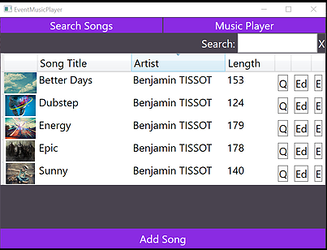
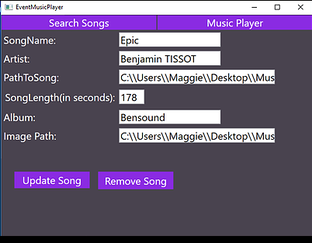
This is where you can search music. Currently the search bar allows the user to search by song title. Each of the columns are sort-able and the add song feature is almost completely working the only issue is I need to add the key when it is sent into the database.
The buttons seen on the side will eventually become a single menu button that you click on and then can navigate based on the songid which is its unique identifier. The only reason they are not in that form right now is because I want to minimize the amount of clicks for testing. If you click on the Ed button it will bring you to the information stored for the particular song. The add screen is the same view however the buttons show as add song instead of update song and back instead of remove song.
|
|
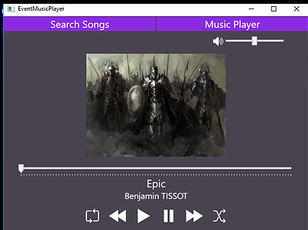
This is the player view is almost done. I need to add either a button that you click and can see the queue or hook it on the bottom of the screen. As well as change the image currently displayed to a sound wave or something a bit more exciting.
|
|
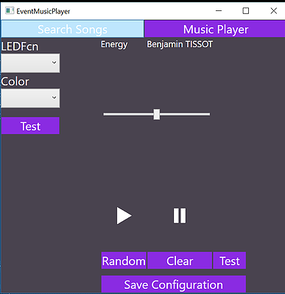
This is the edit view for now. A lot will still change from this. During the presentation today I received some helpful feedback on how to best let users edit the LEDs based on the song.
|
Week 9 ~ March 25,2019
For the past two weeks I've been working on cleaning up my application and hooking it up to a data layer. Currently I am running a database locally with sqlexpress. There was a lot of documentation on doing this so it wasn't terribly challenging, but it still took a bit of effort.
The other piece I had been working on was designing the implementation of the events piece of the project. We ended up ordering that parts a couple weeks back so I should be able to start on the hardware component this weekend. At the current moment my application is broken, but tomorrow night I will post some update screenshots of the current state.
For the past two weeks I've been working on cleaning up my application and hooking it up to a data layer. Currently I am running a database locally with sqlexpress. There was a lot of documentation on doing this so it wasn't terribly challenging, but it still took a bit of effort.
The other piece I had been working on was designing the implementation of the events piece of the project. We ended up ordering that parts a couple weeks back so I should be able to start on the hardware component this weekend. At the current moment my application is broken, but tomorrow night I will post some update screenshots of the current state.
Week 7 ~ March 11,2019
Last week I met with Dr. Pankratz to discussed the hardware component of the project. We went over my design for the led strips. The quick and dirty overview of this is I decided to use ARGB leds which allows the program to program each light individually. I will be using a dynamic array that will correspond with the timeline for the song. For example each cell will hold 5 seconds of events so when you skip 30 seconds of a song you will access cell 5 (arrays start at 0). This way the events can actually be programmed to parts of the song. The array will be an array of structs that holds different functions.
ex:
[
{
"fcn1":0
"fcn2":"255 0 0"
"fcn3":0
},
{
"fcn1":0
"fcn2":"255 0 0"
"fcn3":0
}
]
Zero indicates the event is off for that time. The color will be stored otherwise. After spring break I will be creating these functions. The functions will be event sequences such as flash lights down the strip or doing a rainbow flash of lights. This will minimize the amount of time it takes for the app user to create cool light shows. Only one function can be called per 5 second interval, if nothing has changed from the previous function call when moving along the array it will continue looping the same function will not be recalled. If the user only sets the first array cell to a function and nothing else that same function will continue for the entire song until explicitly turned off.
We are meeting on Tuesday after class to order the parts needed for this part of this portion of the project.
Last week I met with Dr. Pankratz to discussed the hardware component of the project. We went over my design for the led strips. The quick and dirty overview of this is I decided to use ARGB leds which allows the program to program each light individually. I will be using a dynamic array that will correspond with the timeline for the song. For example each cell will hold 5 seconds of events so when you skip 30 seconds of a song you will access cell 5 (arrays start at 0). This way the events can actually be programmed to parts of the song. The array will be an array of structs that holds different functions.
ex:
[
{
"fcn1":0
"fcn2":"255 0 0"
"fcn3":0
},
{
"fcn1":0
"fcn2":"255 0 0"
"fcn3":0
}
]
Zero indicates the event is off for that time. The color will be stored otherwise. After spring break I will be creating these functions. The functions will be event sequences such as flash lights down the strip or doing a rainbow flash of lights. This will minimize the amount of time it takes for the app user to create cool light shows. Only one function can be called per 5 second interval, if nothing has changed from the previous function call when moving along the array it will continue looping the same function will not be recalled. If the user only sets the first array cell to a function and nothing else that same function will continue for the entire song until explicitly turned off.
We are meeting on Tuesday after class to order the parts needed for this part of this portion of the project.
Week 6 ~ March 2, 2019
I finished the research associated with the events last week. I was debating between using fadecandy or arduino. Fadecandy has many advantages for led programming such as less prone to latency, however due to the small amount of leds the project will be using it is not as big of a deal. Next week I will set up a meeting with Dr. Pankratz to go over the design and hopefully order the parts.
I finished the research associated with the events last week. I was debating between using fadecandy or arduino. Fadecandy has many advantages for led programming such as less prone to latency, however due to the small amount of leds the project will be using it is not as big of a deal. Next week I will set up a meeting with Dr. Pankratz to go over the design and hopefully order the parts.
Week 5 ~ February 24, 2019
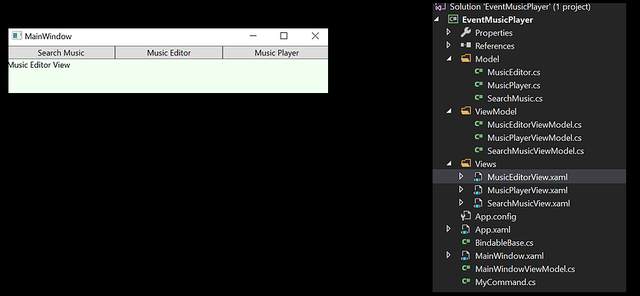
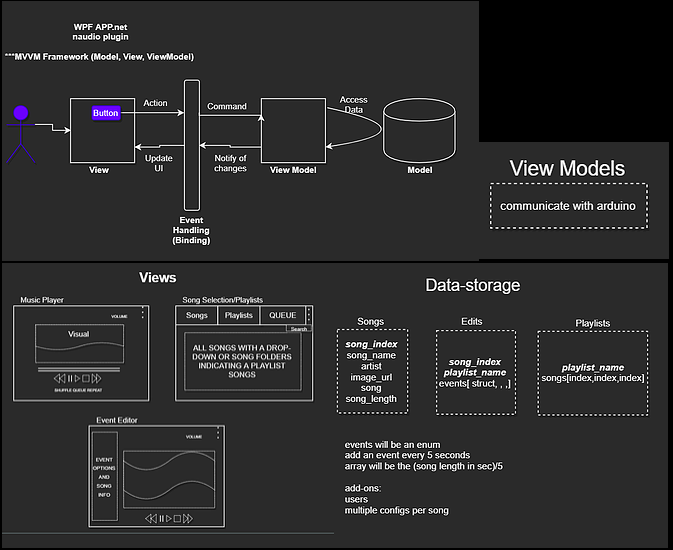
This week I worked on getting the multiple views hooked up. This took a little bit longer than expected due to the conflicting articles online. I also got the timeline bar working and mapped out the rest of the music player portion of the project. This week I hope to finish up the audio player. Currently, I have the different pages linked at the top to make switching between easier. Eventually, I will move it off to the side in a drop-down form. Appearance wise the screen shots from the 18th are pretty much up to date except the stop and pause buttons have been deleted. I included a screen shot of my project layout. The play button will switch to a pause button when the music is playing. The timeline bar doubles as a way to skip ahead in a song or rewind. The forward and backwards button switch to the next song in the playlist or go back a song. For regular song play I'm using a queue. Once the song has been played I push it onto a stack. One thing I don't like about this implementation is if the user goes back a song the entire queue needs to be reloaded since you can't add to the front of a queue. A linked list would solve this issue, but then the project would be categorized as unsafe. If its shuffle it will take the playlist and put it into an array.
This week I worked on getting the multiple views hooked up. This took a little bit longer than expected due to the conflicting articles online. I also got the timeline bar working and mapped out the rest of the music player portion of the project. This week I hope to finish up the audio player. Currently, I have the different pages linked at the top to make switching between easier. Eventually, I will move it off to the side in a drop-down form. Appearance wise the screen shots from the 18th are pretty much up to date except the stop and pause buttons have been deleted. I included a screen shot of my project layout. The play button will switch to a pause button when the music is playing. The timeline bar doubles as a way to skip ahead in a song or rewind. The forward and backwards button switch to the next song in the playlist or go back a song. For regular song play I'm using a queue. Once the song has been played I push it onto a stack. One thing I don't like about this implementation is if the user goes back a song the entire queue needs to be reloaded since you can't add to the front of a queue. A linked list would solve this issue, but then the project would be categorized as unsafe. If its shuffle it will take the playlist and put it into an array.
Week 4 ~ February 18, 2019
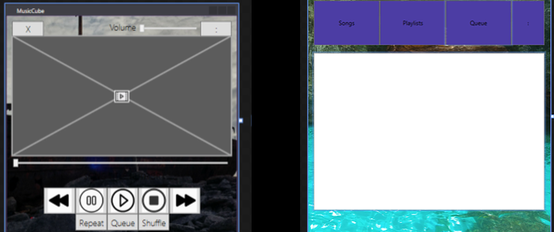
I met with Dr. Pankratz yesterday and we discussed using Arduino for the event portion of my project. Thanks to a little research over break into Arduino (for a Big Mouth Bass Billy Alexa project) I'm feeling fairly confident with it. I'm going to start off by using rgb led light that require <=5 volts and may add more items later on. Next blog post will include exactly what hardware will be necessary to implement this. The images below are snapshots of the current state of the project.
I met with Dr. Pankratz yesterday and we discussed using Arduino for the event portion of my project. Thanks to a little research over break into Arduino (for a Big Mouth Bass Billy Alexa project) I'm feeling fairly confident with it. I'm going to start off by using rgb led light that require <=5 volts and may add more items later on. Next blog post will include exactly what hardware will be necessary to implement this. The images below are snapshots of the current state of the project.
|
|
Week 4 ~ February 17, 2019
Last week I got the timeline bar almost working. As well as prepared a document showing the details of the project. This week I plan to buckle down and crank out some code. This week I will try to set up the music selection menu, queue, and playlists feature
Last week I got the timeline bar almost working. As well as prepared a document showing the details of the project. This week I plan to buckle down and crank out some code. This week I will try to set up the music selection menu, queue, and playlists feature
Week 3 ~ February 10, 2019
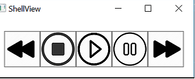
Last week I finished setting up the MVVM Framework along with the stop, pause, play, fast-forward, and rewind buttons. Currently all the buttons are working for mp3 files. Next steps will be to get the sound waves to display on the screen along with being able to mark certain points in the music and save those markings.
Last week I finished setting up the MVVM Framework along with the stop, pause, play, fast-forward, and rewind buttons. Currently all the buttons are working for mp3 files. Next steps will be to get the sound waves to display on the screen along with being able to mark certain points in the music and save those markings.
Week 2 ~ February 3, 2019
So far, I have created WPF App (.NET Framework 4.6.1) in Visual Studios 2017 and downloaded NAudio version 1.8.5 via nuget package manager. The trade off for using c# versus c++ or c is speed, but I believe the amount of time saved coding is worth the performance hit. Another thing that will need to be considered is process interruptions by the garbage collections since c# takes care of it for you it can occur at any times which may result in audio glitches. By not working at low latencies this should be almost completely avoidable. Other things that I will be mindful as I work on this app are sample rates, bit depths, pcm, and clipping/headroom. So far I have the app skeleton created.
So far, I have created WPF App (.NET Framework 4.6.1) in Visual Studios 2017 and downloaded NAudio version 1.8.5 via nuget package manager. The trade off for using c# versus c++ or c is speed, but I believe the amount of time saved coding is worth the performance hit. Another thing that will need to be considered is process interruptions by the garbage collections since c# takes care of it for you it can occur at any times which may result in audio glitches. By not working at low latencies this should be almost completely avoidable. Other things that I will be mindful as I work on this app are sample rates, bit depths, pcm, and clipping/headroom. So far I have the app skeleton created.
Week 1 ~ January 27, 2019
This week I received the project description and started researching audio to build a solid foundation. I've decided on to use a WPF app with C# (naudio). My next steps will be to architect out the design and create a very basic starter application.
This week I received the project description and started researching audio to build a solid foundation. I've decided on to use a WPF app with C# (naudio). My next steps will be to architect out the design and create a very basic starter application.