Blog
Week 15-16: "East and West Shaking Hands at Laying Last Rail" - Andrew J. Russell
This has been a hectic final week for my capstone. I presented my capstone at the presentations and while I was nervous,
I thought it went decently well! I have also done my defense where I 'showcased' my project in further detail to the professors.
They did give me some ideas on some things I could do before the end of the semester though, which I worked on inbetween my other finals.
Overall though, I thought that this was a really fun and informative semester and I'm glad I was able to participate in this year's CS Capstones!
Week 14: "The Mona Lisa" - Leonardo da Vinci
This week has seen both good progress and stagnated progress. I have been able to implement geolocating when uploading
a photo, but also have unfortunately not been able to figure out the reason for the loss of transparency in my pins.
Other than that though, I have begun working on the filter function for my application amongst adding the different
filters that need to be considered for a pin. I have also begun working on my kiosk mode for my project. This Saturday
is the presentations and I am rapidly trying to finish the coding sections of my project before I have to present my project.
Week 13: "Patterson-Gimlin Film" - Roger Patterson
This week has been interesting since I feel like I am so close to finishing the major coding portions but
it always seems to be just out of grasp ... much like bigfoot. I have been working on geolocating latitudes
and longitudes from a location and vice versa. The google maps API has been both helpful and not at the same
time. Other than that I have also been encountering a bug where the transparency of my template pins have been lost
when creating pins for uploaded photos. I am optumistic that I can work through these bugs given enough time
but given the rapidly approaching presentations, I can definitely feel the time ticking.
Week 12: "The Flatiron" - Edward Steichen
Good News! The SNC ITS Department updated the ini file in the server so that I could use the GD library for the
images. Subsequently I now have custom images in pins. I am working on automating that process so that pins will
have cool looking pins when users upload them. Also, I have been battling how the javascript fetch API and .json
functionality wants my json files to be formatted(as one large array)
versus how all of my php functions handle the json files(newline deliminated). I found a potential solution in
a thing called json lines. I actually solved this problem later this week by seperating the read in string by
the newlines and saving it to an array. I then used the json parse function to turn those strings into json
objects which I can then use! While I was meeting with Dr. McVey-Pankratz, we discovered that the pins will
display and load on most browsers except for DuckDuckGo which was interesting. Overall, I am racing to get functions
"finalized" so that I can start focusing on my presentation.
Week 11: "Pillars of Creation" - NASA
This week was interesting for a variety of reasons. First I had been encountering an issue when a user would
login that the page would crash. The issue was that I forgot to include my account class in the file so it did
not recognize the object or its member functions. Second, Dr. McVey-Pankratz and I investigated a couple of the
ways that I could put images that a user uploads into the custom pins that were created. We found that there was
a php library called the GD graphics library that was supported natively in php. unfortunately the library does
not work at the moment. There are currently two potential reasons why, the first being that the library is not
downloaded/installed on the compsci04 server which would require a restart. The other potential reason is that
in the .ini file for the server that the code that initializes the GD library is commented out and as such would
require a server restart if it could be uncommented.
Other than that though, I have been working on further improving the interactions between the different functions
on my website. I might make two versions of the index page so that I can do things with session variables easier.
The idea is that if a user is logged out then if they interact with any function that requires them to be logged in
then they will be prompted to log in and if that is successful then they will be moved to the index page that has full
interactibility.
Week 10: "It's Alive!" - Young Frankenstein
This week started with me connecting all of the functions that I have written together with my google map.
I also started playing with how the different parts of my project worked/interacted with each other.
More specifically, I added sessions to my project and have needed to update some of my functions
so that they correctly work with sessions. Thankfully when I was adding sessions I did not crash
compsci04 website! I also have been exploring how to make images appear in the custom pins that I
have created for my project. Other than that though, it has been a lot of bug testing and fixing.
Week 9: "First Digital Photo" - Russell Kirsch
I was able to dynamically add photos the google map this week by reading from a file.
One of the major challenges that I encountered was that while trying to read from my
json file, it would read the first line then crash because it encountered a
'non-whitespace character' The non-whitespace character that it encountered was the
newline however. It was fixed by adding square brackets and commas around the
data entries making it an array of json encoded photo metadata. The other issue that I
encountered was that markers were not being displayed in the correct position on the map.
This issue was solved when Dr. McVey-Pankratz and I found that I had a typo, so that when
uploading a photo, it didn't actually save the longitude in the correct variable as I had
it spelled without the 'i' in longitude.
Week 8: "Spring Break"
This was a pretty relaxing week for me but I was still able to get some work done for
my Capstone project. I wrote an edit and delete function for the photos that users have
uploaded so that when a user uploads a photo they can still interact with them. Other
than that I mainly relaxed over this week.
Week 7: "First Flight" - John T. Daniels
This has been a productive week right before Spring Break. I have been able
to make progress on multiple things this week and one in particular is that
I was able to place a pin, that was hardcoded, onto a google map. This is exciting
because the API documentation for google maps is not the most clear about how certain
functions and code blocks fit together. The main issue that I had been running into
was that certain javascript code blocks don't seem to like being called from a seperate
file. I am investigating this because having a seperate javascript file would be nice.
Other things involving the map is that I am researching how to customize the pins to
the custom ones that I designed for my application.
Besides that though, I plan on trying to relax over spring break before I dive headfirst back into
my project, but I still plan to get some work done that should not be too intenisve
to work on. For instance, I have been able to begin writing the edit and delete functions
for users. I also plan on setting up the backend structure for my application to save
myself from the likely headache of organizing things near the end. This way I can have
an organized space for me to add things into the main version without having to specify
weird file paths and not have multiple non-developmental copies floating around.
A hard coded pin on a google map

Week 6: "The Horse in Motion" - Eadward Muybridge
This week has been exciting in the sense that things have started to
come together and I am now saving json encoded data to a file. This
encoded data can then be used to display photos on a google map.Incidentally,
I can reuse, with small modifications, much of my code to make a function
that allows users to edit their photos. The only challenges that might
show up is making sure to not overwrite data and to successfully change
the encoded data and not adding a new entry in the json file. As of this moment,
I am not writing all of the data that needs to be in this encoded data as
I have not created the means for the data to be filled yet. Some of this data
includes the user id and I am still working out some bugs in the unique id's
for each photo. For next steps in this upcoming week, I will be meeting with Dr. McVey-Pankratz
about getting a google map up and running so I can begin displaying photos.
Other than that though, it will be plenty of bug testing/fixes and writing of
different functions that users will have access to when using my program.
Week 5: "A Sea of Steps" - Frederick H. Evans
This week saw bugs fixed and involved lots of planning out how
someone interacts with my program. At the start of the week, Dr.
McVey-Pankratz helped me solve why certain JPGs were not able to
be uploaded. The issue was that the default upload size is 2 MB
so anything bigger than that fails. For now, I am capping photo
uploads to 2 MB until we can adjust the max file size when uploading
to the server. I added an event handler using javascript that will
check the size of any to be uploaded photo and will alert the user if
the file is too big.
In the later half of the week, Dr. McVey-Pankratz also helped me work
through what types of users had to exist in the context of my project
and what each respective one had access to and could do within the framework of
my project. There are currently three "types" of users. The first
is a base user. This user will be what everyone who wishes to upload
a photo will be. They will have the ability to upload photos as well
as edit and delete their already uploaded photos (They won't be able
to modify other users photos though). The second is an admin user who
will have more access than a regular user. They can modify any
photo's data as well as delete photos. The final type of user is defined
as "other". This type of user only has access to look at public photos.
Other than that, we talked about the general timeline of my project.
Week 4: "The Haystack" - William Henry Fox Talbot
This is a shorter update but worry not, this week has been one where
some roadblocks have been cleared. I would like to thank Abby Kramer
for helping me out with gaining access to the google maps API. Other
than that though, I have continued working on the program that grabs
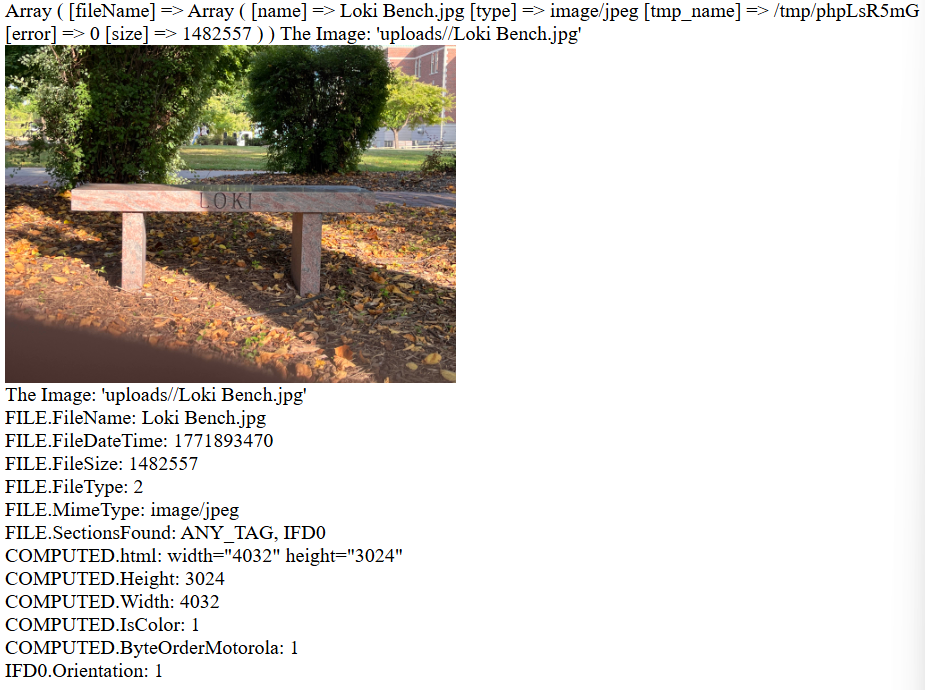
the metadata out of photos. For the most part, when I upload an image
it will pull the available meta data out of the photo. I am in the process
of planning out how I want to prompt the user to enter any missing information
that could not be found/pulled from the metadata. I am using the
exif_read_data function for grabbing the metadata though. This function
works really well for JPGs, but not for other formats like pngs or HEIC.
I am also experiencing a weird bug where certain JPGs can't be uploaded
and I am debugging that currently.
A very rough example of the backend of the upload program.
Week 3: "Boulevard du Temple" - Louis Daguerre
This week has been an interesting one since I am now working on a
portion of my project that I had not initially planned on working on yet.
As I talked about in the previous blog post, I was trying to start
working with the google API and go from there. Unfortunately I ran
into an issue, weird google terms of service, that forced me to pivot
temporarily. I am now coding a program that can be run when a user uploads
a photo that will grab relevant data from the photo, such as gps coordinates
, and attempt to locate the photo as best it can with the available meta data.
If it is unable to get enough information from the photos meta data then I plan
on the program prompting the user to fill out the necessary information.
As of the time of me writing this, I have run into the issue where I don't
seem to have "access to local resources", I ran into this issue when trying
to test my code with just local files first. I don't know if this is a setting
thing or something else, but I am actively investigating it.
Week 2: "Graphic Design is my Passion"
I spent most of this week thinking about my project and how exactly
I would need to spend my time in order to do it. I have also finished
coding a website for my project in order to help me practice some html
and css. While I'm sure that the website will go through a couple of
minor changes throughout this semester, I think that it has already
turned out really well. Next, I have found out where I can gain access to
the api key for google maps so that I can truly begin the coding portions
of my project. Finally, I have started thinking about how I want to users
to see images displayed on their device amongst other logistical questions.
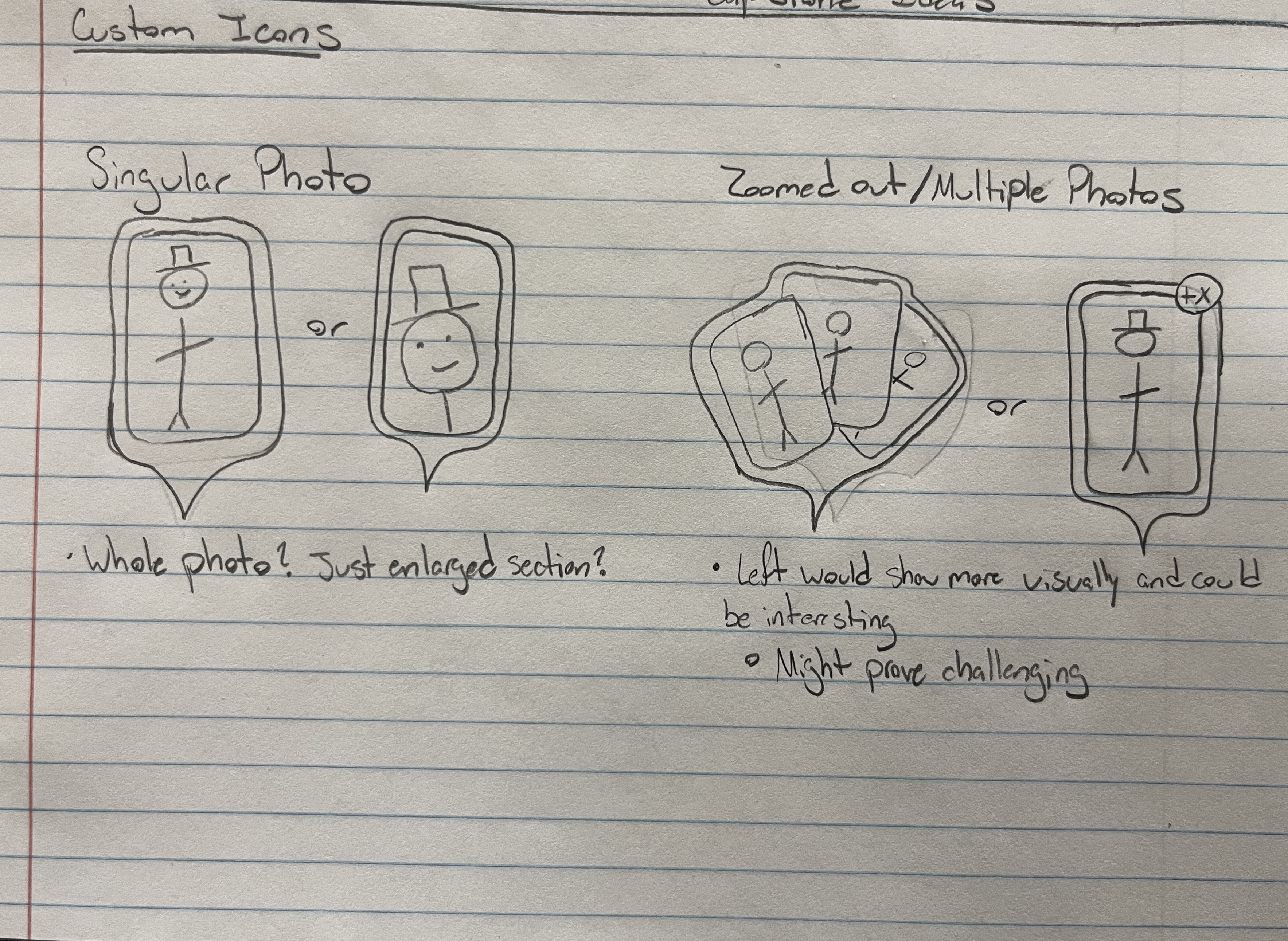
Image of some initial designs
Week 1: The Setup
This is my first blog entry for my Capstone project! Most of this
week has been spent getting things setup for myself, so I can
dive headfirst into this project with a solid footing. Much of the
setup has been learning how to code in html, css. I also began to
research whether to use google maps or arcGIS's API for the map in
my project. I also began thinking about what exactly my project
would need to function.