
Post #1 (2/7/2026)
So far in my capstone project, I have focused on establishing a strong foundation for my board chess tracking application. After researching different languages, I decided to use React as the primary language for building the app because it allows for better documentation and enables my application to run on various platforms. I found a YouTube tutorial to begin learning how to code with React, as I have never used it or interacted with it before. The video is around 11 hours long, and my goal by the end of this week is to have a good enough understanding of the language to where I can get access to the camera.
Post #2 (2/9/2026)
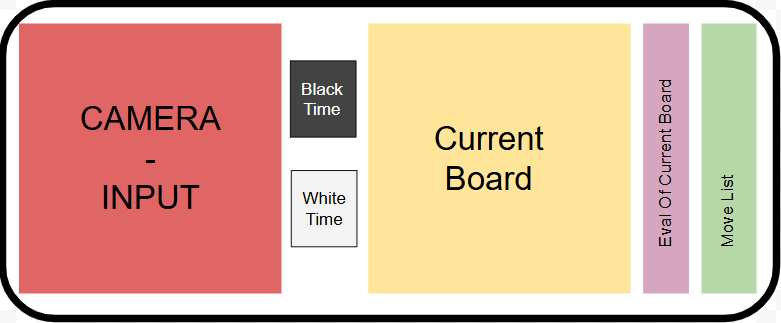
I have now started to work more in depth on my plan for this project and how I would like my interface to work, as well
as the
flow of my data and interface.
See below for my current plan for the in game UI (User Interface).
Post #3 (2/16/2026)
This week I gained access to the camera through React, and began looking forward at next
steps. We determined that a good starting point would be to begin with analyzing still
images, then dealing with capturing frames from the live camera later. My goal for this
week is to begin experimenting with tracking these images, as well as getting sample videos
of me playing chess so that we can test different possible angles, as well as potential issues
that may arise that we haven't thought about yet.

Post #4 (2/23/2026)
I am now diving into the meat of my project: image tracking. I have begun with coding in Python - a language I am much
more familiar with than JavaScript, and will later transfer over the same logic to my JavaScript code. Currently I am
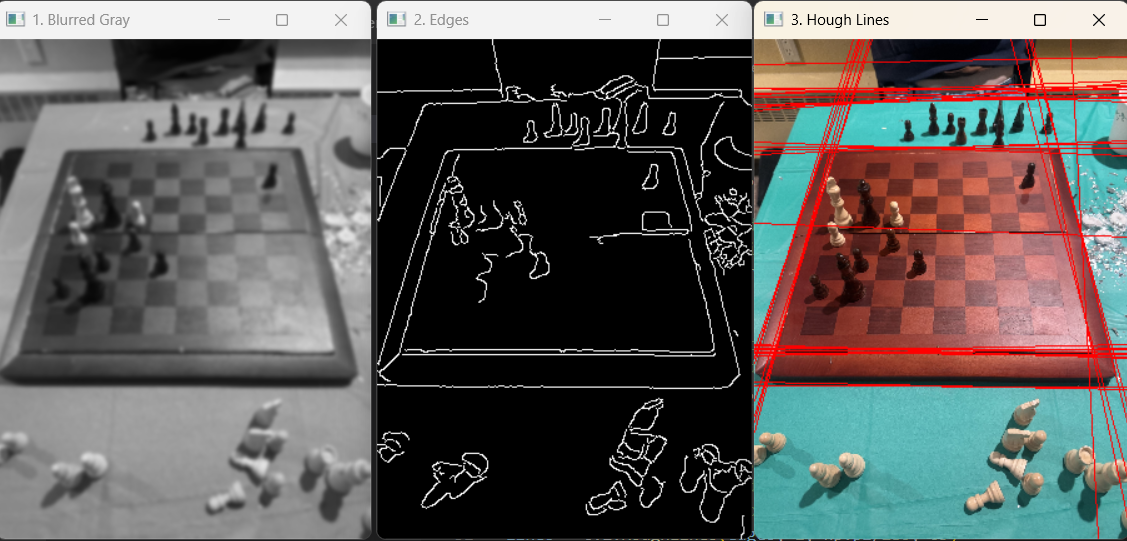
able to identify the edges of the board, and
draw Hough lines
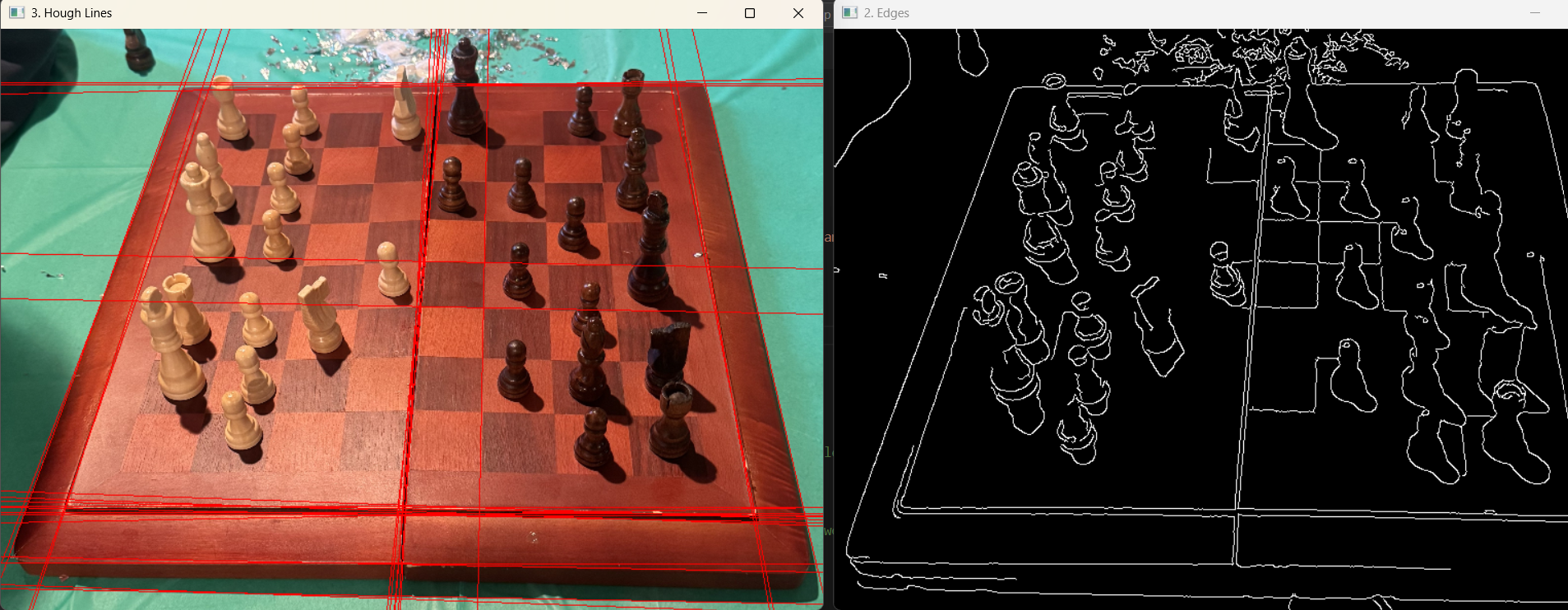
to detect the edges of the board (see first image below). Now that I am able to identify the edges of the board,
my next steps are to begin to crop out all the unwanted parts of the image (see second image below) and begin to
identify the squares within this image.
You can look at this PDF for a more detailed description of how I created my
hough lines
.
Post #5 (3/1/2026)
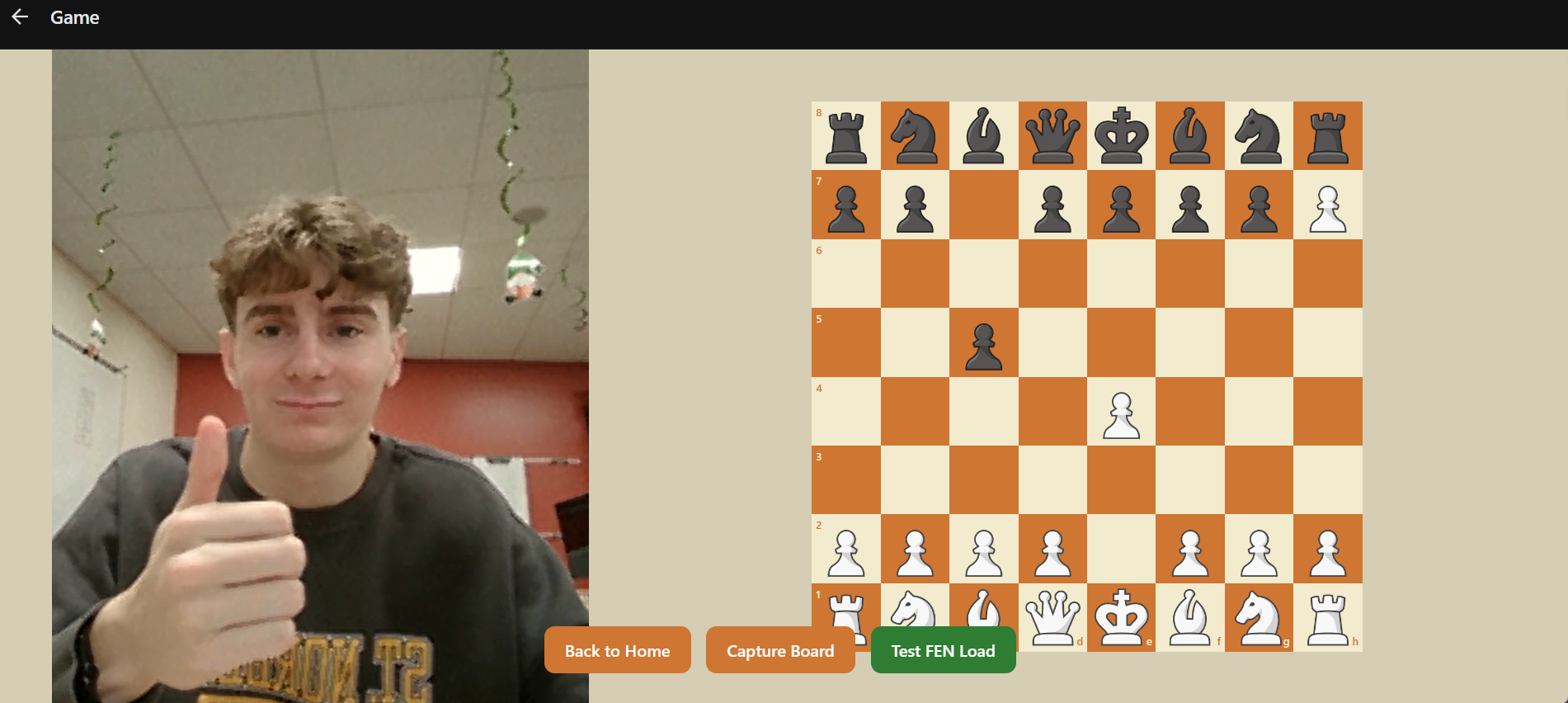
This week I have continued to make progress on both my app as well as my image tracking logic. On my app, I have added a board to
visualize the image recognition into my app (see below). The board takes a FEN and visualizes it on the board. This will allow me to
easily link the visualized board to my image tracking logic, as long as I have it return the updated boards FEN.
Here
is the link for the youtube video that I used to learn how to create the board.
Dr. McVey also recieved the a new chessboard for me to test on, and I have begun working with that board, as the contrast between the
squares is much higher than the board I have been testing on. I have added code so that the user is now able to select which edges
are correct based off of the intersections found through edges. The first code that I added was to filter out all lines that are not
either vertical, or horizontal. I learned through trial and error that a vertical tolerance of 25 degrees and a horizontal tolerance
of 5 works best to pick up all wanted edges without adding too much extra noise. I then filter out lines that are too similar to reduce
noise on the image. I then loop through all vertical and horizontal lines and find all possible intersections.
These intersections are then filtered to make sure we are only showing points within the image bounds.
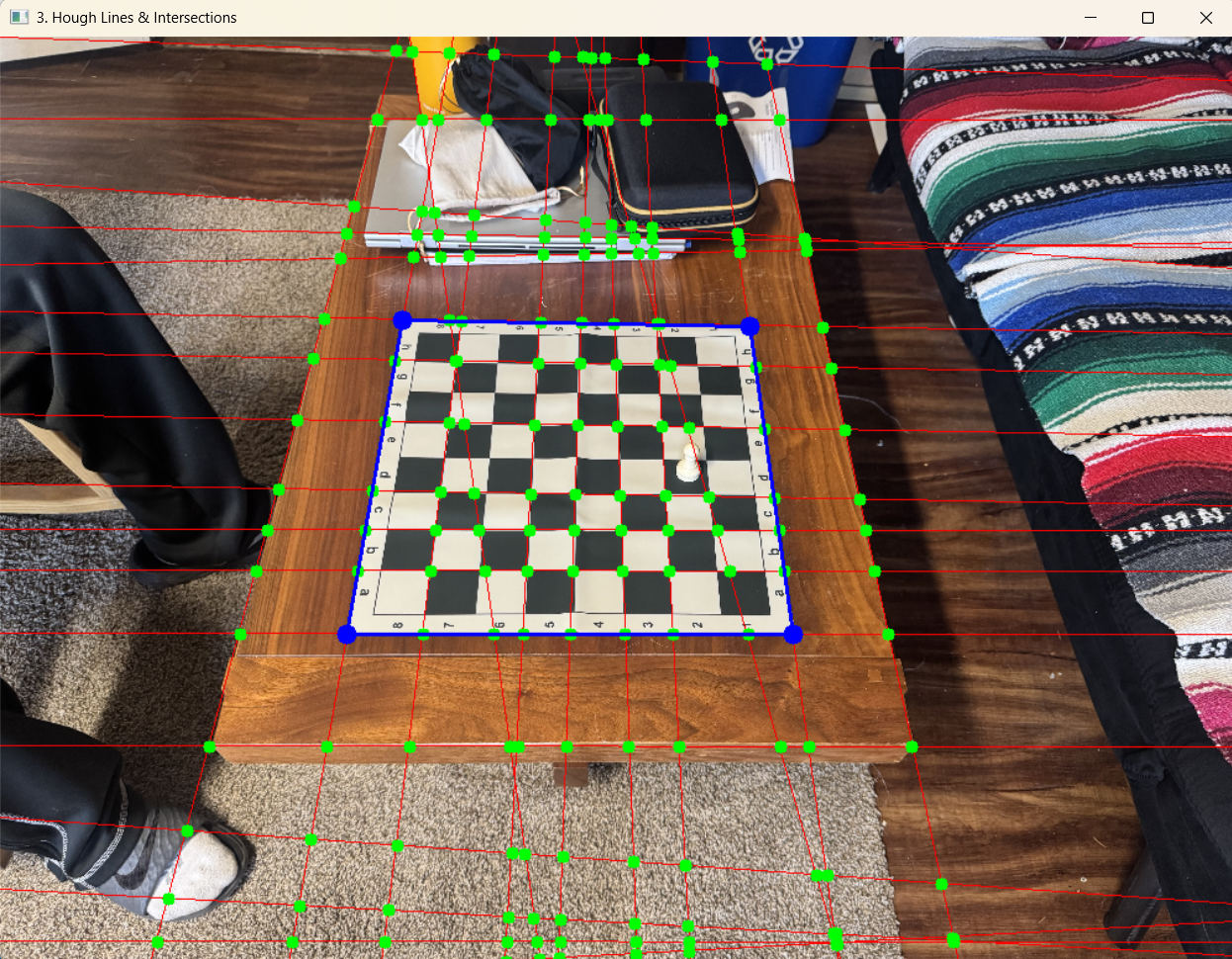
Once the user has selected the 4 edges, the board is then warped to appear flat so we can try and calculate the 8x8 square. This is where
I am currently getting stuck and need to come up with ideas on how to calculate this.
Post #6 (3/8/2026)
This week has been a bit slower than others. I have basically just been reusing code that I have already written to complete the
rest of the calibration process. In order to finish this process I need to go back and edit my function that generates the hough lines so
that after each generation it checks to make sure that there was a minimum number of lines drawn. This should help with the calibration where
we need user input to make sure that the user has the correct choices to select. I have found that the distance the user sets up this camera
requires very different settings, so by adding this small part it should solve this issue.
I also have begun planning how I am actually detecting piece movement. Between the CS professors we managed to come up with 2 solutions
(one of which is much more preferable than the other). The first and ideal solution is to detect the number of edges found in each
of squares. By comparing previous runs to our current runs, we should be able to determine which piece moved by checking which square
now has more edges than it did previously.
If this does not work we have a backup plan of creating a
neural net for piece recognition. The amount of data that I would have to
collect to implement this however would be less than ideal.
Post #7 (3/13/2026)
Holy Moly! So much progress! This week, I spent my time implementing and planning out
how I will track pieces. The first step I took was beginning to
plan what steps I need to take in order to
track pieces.
After creating my plan I began to implement these changes to my code (not fun). After
implementing, I have found that this logic does sometimes work, but not always. In the
following test runs using still images, the current
logic works well for obvious moves such as opening pawn moves. However, later in games, such as
in run 4, where moves are not as obvious or pieces are hidden, it doesn't do such a great job.
My plan is to change around the logic so that rather than comparing squares
with pixel gains to squares with pixel losses, we find the squares that had the greatest change
in pixels, find pieces that could have moved there, then try and figure out which one of those
pieces actually moved.
Post #8 (3/26/2026)
This week brought some major breakthroughs in how the application tracks pieces and registers moves, especially in
complex board states where my previous logic was struggling.
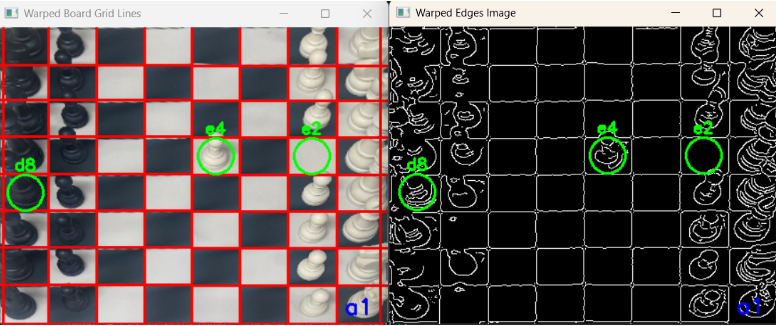
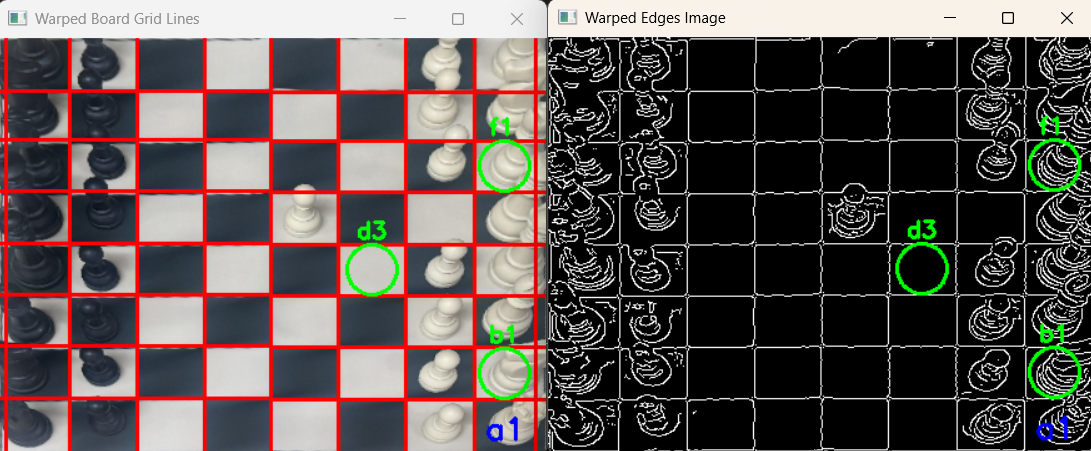
The first big improvement was refining the image conversion process. I realized that my previous settings were
losing too much detail, and often losing pieces all together, so I lowered the blur and reduced the thresholds. This adjustment allows the program to pick
up the finer details and edges of the pieces much more clearly. See below for the images of runs on the previous
settings vs the new settings. (Ignore the marked squares)
 The second major update was an overhaul of the move-detection logic itself. Previously, when the application detected
pixel changes, it was essentially just randomly checking possible moves to see what fit, then picked the first one it
found that met the requirements. Now, I have implemented a dedicated scoring system. When the camera detects a change
in a square, the algorithm evaluates all the possible legal moves that could result in that change and assigns each one
a score based on the image data. The move with the highest score is officially registered. This shift from random
guessing to an analytical scoring system has drastically improved the accuracy of the tracking.
The second major update was an overhaul of the move-detection logic itself. Previously, when the application detected
pixel changes, it was essentially just randomly checking possible moves to see what fit, then picked the first one it
found that met the requirements. Now, I have implemented a dedicated scoring system. When the camera detects a change
in a square, the algorithm evaluates all the possible legal moves that could result in that change and assigns each one
a score based on the image data. The move with the highest score is officially registered. This shift from random
guessing to an analytical scoring system has drastically improved the accuracy of the tracking.
Looking forward, I plan to continue testing the current logic on more games to see what new problems may arise. However,
I am hoping that minimal do arise, as yesterday I with the current logic the application correctly tracked a 27 move sequence,
including a 2 castling moves, which is where I was a little worried my current logic might fail!
I am now beginning to think about how I will determine which frames I would like to analyze, versus the frames I would like
to throw out (such as frames where a hand is in the way of the board).
Post #9 (4/1/2026)
This week I have been focusing on testing my current piece tracking logic for common bugs.
My main goal was to observe the program in action and try to identify common issues or patterns that
cause it to choose the wrong move. I've been digging deep into the decision-making logic on moves where the output
wasn’t correct. Thus far, I am very happy with the performance of my current logic, with around 97% of moves
correctly evaluated. The moves that are incorrectly evaluated also seem to be following a pattern, which I
believe I will be able to solve by adding special cases to my logic for taller pieces.
Amidst all the troubleshooting, I achieved a huge breakthrough: my program can now successfully output its played
games as a PGN (Portable Game Notation) file! For those who might not be familiar, PGN is the universal
standard text format for recording chess games. Having access to this kind of high-level external analysis will
streamline my debugging process tremendously. To show off this new feature, I’ve attached a video demonstration below.
The program is fed a 50 move sequence, it then automatically generates the PGN file which can be fed into chess
websites such as chess.com for analysis.
Post #10 (4/12/2026)
I am now satisfied with my logic for the move tracking. This week, I added two special cases to fix some
incorrectly predicted moves caused by how the camera views the taller pieces:
Fixing the "Bleed" Effect: Tall pieces moving away from the camera look like they are leaning into the square
above them. This caused the system to think a piece landed one square higher than it actually did. To fix this,
the logic now dictates that if two empty squares on top of each other both suddenly gain a lot of pixels, the
piece is assigned to the lower square.
Finding Hidden Pieces: Sometimes a tall piece is hidden directly behind another piece in the camera's view.
When that hidden piece moves, the camera only notices pixels disappearing from the empty square above it.
To fix this, I added a rule: if an empty square loses pixels, check the square right below it. If there's a piece
there, assume that's the piece that just moved.
Moving forward I am beginning to work on determining what frames are good and we want to analyze, vs which ones are not.
After that I can begin sending my logic snapshots from the live camera to begin tracking games in real time.
Post #11 (4/20/2026)
This was a week where I spent a ton of time working on my hand detection logic. Pretty much everything was done through
trial and error. I first tried to detect hands by checking pixel counts. This unfortunatly did not work, as the pixels
generated by edge images are too inconsistent, and there was no consistant pattern that images with hands had so that I could
detect these.
I also expiremented with hough lines, this once again was too inconsistent, and there was no consistent pattern that images
with hands followed so that I could use these hough lines generated to detect hands.
This brings me to my solution that did work (and that I think is so so cool). This is also very convenient because it was probably
the best solution of any of them, and would be the one that would probably be used in a production level app. I built and trained
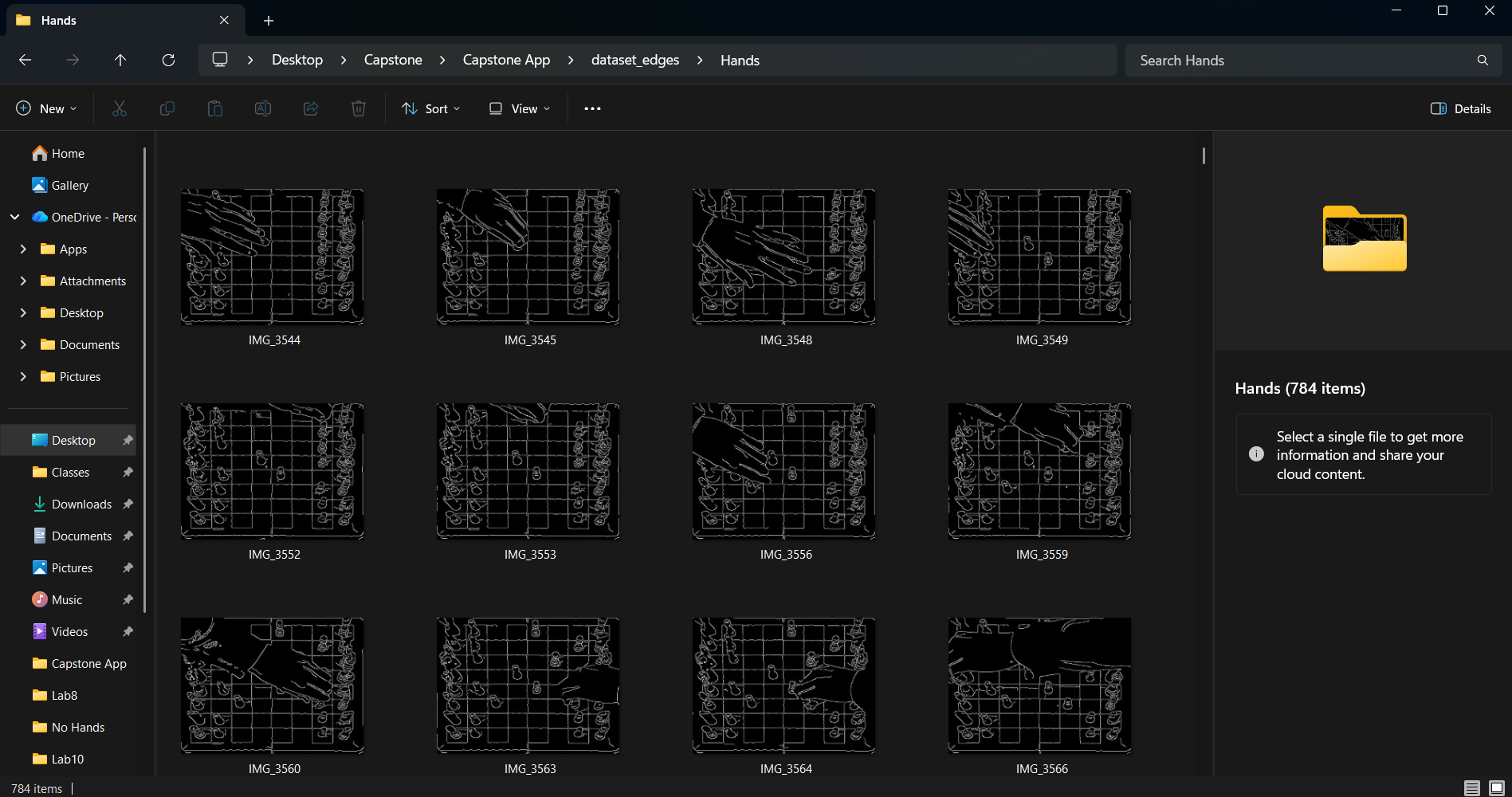
a CNN (convolutional neural network) that detects hands on these edge images! To do this I collected around 1,500 images, around 800
with hands in them, and 700 without, and trained the model based off of these edge images genererated. (See below). After trainig,
I managed to get my model to around 92% accuracy, which I believe should be good enough to use in my app, as it can get multiple frames
to guess if there is a hand in there, so if we send the logic multiple frames, say 5, and only 1 returns with no hand, we know there was probably
a hand in all 5 of the frames, and we can wait until we find a series of frames without a hand to send to our piece detection logic!
This is super exciting. I now have all the pieces I need in order to build this app, which is my plan for the final week is to now just build
the app and improve the UI on it.
Post #12 (5/5/2026)
This will be my last ever blog post. If you have made it through all these, I would like to thank you for following
allong on this journey with me, I hope you found it as interesting as I did! From my last post, I have now gotten my
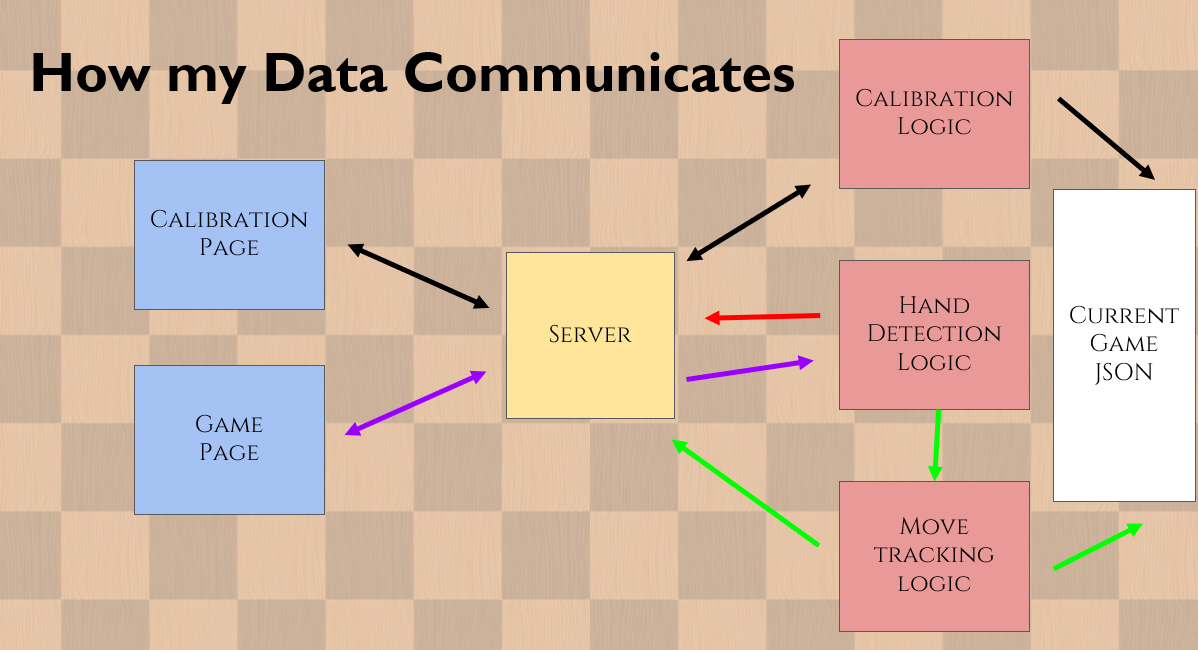
app up and running to a basic level where I am somewhat satisfied. You can see how my data communicates, as well as a
sample run of the app below.
Moving forward, I plan to get my developers license so that I can publish the app. The first thing I need to do is move
all logic that is on the JavaScript, from the Python files I have. This should allow me to analyze many more frames per
second than I am currently.