The Process Blog
Week 14 - 05/04/2026: Going through the Defense and Updating Website
Updated on 05/12/2026
This will be the final update to my capstone blog. This week I finalized a lot of my code in my two applications. This doesn't mean that I completly stopped working on improving them though. During this week, I also had
my Defense presentation with the professors which is sort of like the presentation, but more of a defense to your code and what you did and why. It was a lot more of the technical side to the project since the audience
was made up of people who understood the technical side. I mostly explained my roadmaps of my applications to them and answered questions about my code when the professors asked me. They also gave a suggestion to add a
dropdown of games to the home screen of the main app instead of having the admin app control it all. This would allow the app to be more flexible in nature and was a better fit for the app. While updating the main app to
the dropdown instead of the Start Game button, I also added a timer that times the user for how long they took finding the clues. On the admin side, I also added a new tag to the Game structure
called "LocationPlace". This stores the location of where the game will be played, and the main app will decide on bluetooth metrics that work best for that area. The four areas I have an admin pick between are: Inside-Room,
Inside-House, Inside-Large Building, and Outside. I also finialized the website and made sure all my requirements are on it. This semester has been a great and bumpy ride, and I'm excited for what is to come! I currently (as of
5/12/2026) will be working with an Energy Company, called Constellation, fulltime after graduation. So I am excited to get into the real world, and not have the extra homework on top of an almost work hours day, but it is bittersweet
to leave behind friends and faculty who have supported me along this journey. Thank you to all of the CS professors, but most especially to Dr. McVey! I would not have gotten through capstone without you all or even through getting
my undergraduate degree. I am deeply appreciative of the work you all do and just how much you all care for your students and want them to succeed. It's been a great joy getting to know you all!
Signing off...Hannah Thiry
Week 13 - 04/26/2026: Crossing the Finish Line...Lots to be done before Capstone Presentations on Saturday
Updated on 05/12/2026
This is another week where I had pure productivity. I accomplished so much in so little time; it is a miracle I was able to pull it off before presentations on 5/02/2026 and have it go as smoothly as it did.
At the beginning of the week, I was still in the prototyping stage. I was able to combine the GPS logic I created in a separate page on my app to the main clues page in my main app. This allowed me to fully run a
game! FINALLY! It was such a joy being able to do that for the first time, but first I must tell you about the flow of my main app. When a user goes to the "CluesPage" ie. starts a game, they are finding the distance
to the clue using GPS first then once the user is within a certain amount of feet to the beacon, the app will then go to BLE scanning and start scanning for the beacon. If the scan cannot find the beacons then the program
will go back to getting GPS for the distance. I demoed this prototype with Dr. McVey with all the debugging text still there, and the user had to click a button to say they found the clue. I hid beacons and added clues to them
with my admin app and then had Dr. McVey find all the clues using the main app. I was having difficulty prior to this with the altitude being incorrect and unreliable. I changed this by setting a limit on the accuracy of the GPS
coordinate the phone got. I won't take a GPS coordinate that has more than 25m as an error bounds. This proved to be quite effective, and I was able to get consistent readings for the altitude! This allowed me to hide clues on
the same plane in a 2-D sense but have the app recognize that the user hadn't found the clue yet due to the altitude creating the 3-D I needed to create that. After demoing with Dr. McVey, we talked about some ideas for how to
demo the game inside GMS 1097 which is the room the capstone presentations were in. I ultimately went with a two clue game to be played during the live demo where I had my fiance, Ryan Bekkers, walk around the room and show how
the numbers changed based on where you were in the room and where the clue was. I hid one clue where the food was and I hid another clue by where a faculty member (Dr. McVey) was sitting. This made it easy to see the changes without
the demo going for too long.
After the demo with Dr. McVey, I added a few more things to the app to improve its quality. I had the clues auto-complete once the user got within 5 or so feet of the clue (I had changed everything on the UI side to reflect feet at this point.).
This was so the user didn't cheat and click a button to go through all the clues. I also cleaned up the user interface and removed all the debugging text I had on the screen. I also added a pop-up message similar to the confirmation messages in
the admin app. This pop-up message let the user know when they found the clue and also let them know when they found all the clues. All of these little features made my application have a much better quality and feel to it. After those updates, I
tested it out with Dr. Hagedorn who wanted to find the clues as quickly as he could. He played the same game that Dr. McVey did in GMS. He said that overall it was great! When I asked him for suggestions, he mentioned that I should not do anything
before presentations, but that a hint button may be nice to let the user know if they need to go up or down some flights of stairs. I thought this was a great idea and thought it wouldn't be a tedious thing to do, so naturally I decided that I should
update my app with this hint button. When a user has a GPS coordinate they are able to click the hint button and see the elevation difference (in m for now, might change it to ft later) for where they are. So if a user was on the first floor of GMS
and the clue was in the basement the user's hint would read about "4m". So they would know that they are 4m above where they should be. If it were the opposite the hint would read as "-4m" telling the user they would have to go up in elevation.
All of this aside, I presented on Saturday after creating and practicing my presentation slides multiple, multiple times. The presentation went really well, and I was happy to be one of the first people going that day to not be nervous the whole time.
I was able to enjoy the other's presentations, and I loved seeing what everyone had poured so much time and effort into.
The demo went well as well, which I was a little bit surprised since the room I was in had a lot going on BLE wise with everyone's phones, watches, earbuds, and everything else. However, the app ran well and actually pretty fast, which I was pleased with.
As of now, my project is pretty much completed. I may add a few more things just due to the nature of how I transition my mind from one subject to the next.
Week 12 - 04/19/2026: Nearing the Finish Line...The Anxiety and Stress Rises
Updated on 05/12/2026
This week I was super productive! Probably due to copious amounts of caffeine and the looming deadline for Capstone presentations. During this week, I have a laundry list of items I completed. I focused my time on finishing up the admin app. This means I added functionality to delete a specific clue and to delete all clues from a game. I also added a confirmation pop-up message that came from the device modal. This ensures the user was actually wanting to delete the clue(s), and it just confirms it's what the user wants before deleting it. I also added functionality to delete a game from the app. The logic was similar to deleting clues, so it wasn't terribly difficult. Due to wanting to delete a game as simplistically as possible, I decided to change my file structure for games just a bit. Instead of having a master file for games and an individual file for each, I reduced the redunancy by only using Games.json which is the master game file. It holds all the games' data. Another thing I added was it bothered me that the save button was visible when there was no name for the game. So I added code to hide the save button if there wasn't at least one non-space character. This way the save button is only visible when there is a game name. I also figured out that a 4 digit GPS coordinate was waaaaaaaaay more accurate then a 2 digit coordinate. Thus, with all of this work done, I completed my admin app's functionality. At least to the point where it would be demo-able for the professors and the presentation. With everything completed for that, I switched my focus back to the main app to code the rest of the GPS distancing. I started by getting the User's location and hard-coded the clue's location. I also worked off of a new page just for GPS. I was able to get pretty far with this and will integrate the functionality with the main clues screen next week.
Week 11 - 04/12/2026: Warmer Weather, Busyness, and Thunderstorms...
Updated on 04/20/2026
This week felt like a rollercoaster in every aspect of my life. There was warm, there was cold, there were thunderstorms, and changed plans, but I made it through! This week I was super busy, it felt like everything just ramped up all at once, so I had to focus a little more on my other classes for a bit. I did find time on 4/13 to work quite a few hours on my project and I accomplished most of the functionality for the admin app after that and a meeting with Dr. McVey. During our meeting early in the afternoon on 4/13, I told her about my progress from last week on the admin app and asked her for help on how to write a file to the CompSci04 server. I had tried multiple different methods such as putting empty files on the server and trying to edit them, but the methods didn't work. Her and I worked on this for quite some time and eventually found that using a PHP file that would be called when trying to upload or change a file worked. This PHP file lives in the same space as my other json files. After that meeting, I still needed to learn how to connect a beacon without closing or changing the screen due to loss of information when that happens. I also needed to implement a GPS function that grabbed the user's GPS coordinates (longitude, latitude, altitude). I used the function I created in the main app to help with at least getting the GPS coordinates. I also dug around a bit online to see if I could find a solution to the beacon connecting without changing screens problem. After a while, I couldn't find anything I could use how I wanted, so I asked Copilot and it gave me some styling techniques to make it look like an Android pop-up notification without it actually being from Android. After spending those hours on 4/13 working on the project, I now have an almost fully functioning admin application. I just need a few more things. I need to delete a game, delete a clue (not just add one), copy/paste/change the DisplayGame screen since I largely worked on the CreateGame screen and they are nearly identical (except for one having existing information already). I also need to set up a configuration screen that will configure what game the user on the main app is playing and possibly some other settings. At the moment, I will be giving up on the idea of a map that shows where the beacons are using the GPS coordinates in the clues because it's currently not necessary and I need to focus more on connecting the two applications after the admin app is fully functioning.
Week 10 - 04/05/2026: Walkthroughs and Breakthroughs.
Updated on 04/20/2026
This week I fixed up the code from 4/1 and tested, debugged, and organized the code to be sure there weren't any surprises or other oddities that occurred that needed fixing. I also fixed my BLE code and added a timeout
of 20 seconds to the scan function. This means that if the targeted beacon wasn't found in 20 seconds then that must mean it's out of range. I have the scan stopping at this point and then I will eventually have it switch
over to use GPS instead of BLE in order to track the distance between the user and the clue. I also finally started implementing the geolocation in the main app. Once the scan times out, the function then calls a GPS function
I created that outputs to the console log and gains the user's location through a function in geolocation. This worked out great! I just fixed the numbers to the second decimal point because the numbers were really long. I'll
test for accuracy later on when I start to implement distance between two points.
I started the admin app as well this week! It doesn't look too pretty yet by any means, but I started to implement more to the user interface than to functionality. Once again, I am reminded that React Native is hard to design with
I much prefer how PowerApps operates where I'm able to drag and drop and put the screen components anywhere I want without having to tweak tiny little things in the code to get a button in the top left corner or have buttons line
up with each other in a row. All that aside, I started with a completely brand new bare react native app instead of copying and pasting from the main application. I was curious to see the updates to React Native, since I had copied
and pasted from Elliot's 2024 capstone project to start the main app. I should probably pull that into a new application for bare React Native as well so everything is up to date. I will do that if I have the time at the end. Once I
had a clean application, I then tranferred over some files that I used in the main app and will use in the admin app. This mainly was App.tsx and Home.tsx. I copied Clues.tsx at first, but then realized I would need vastly different
screens for the admin app and then got rid of it. Once I was all set to make UI changes, I did a lot of UI work on the app. This was to set myself up for success when I eventually added the functionality to the app. I added a new data
piece to store. This was called a Game. A game structure is made up of three items: an ID, a name, and an array of clues. So instead of using the Clues.json that I had been using, I will now be using two different types of files at least
for the admin app. I will be using Games.json and Game#.json. Games.json is a file that will allow me to display all the games within a dropdown for ease of use for the user. This will be on the home screen of the admin app. Game#.json
is a file that instead of # will be the ID of the Game. This allows me to look up this file and easily show the user the different clues when a user wants to edit an already existing games. I could have used Games.json for this but for now
this method will work. I will change it over to Games.json if needed later on.
One last thing I did this week was a walkthrough, or a demo of what I have so far, to my capstone class. This is to prepare ourselves for the eventuality of presenting in front of a group of people on May 2nd. This is a huge event with alumni
coming from all over to watch this years juniors and seniors projects. There are also several people who watch over a zoom call. I've gone every year (and zoomed last year since I was in Spain) because I've loved getting to know the different
projects I might get when I became a senior. I'm so excited to take part in the capstones this year! It almost seems like a rite of passage into the real world, lol. The walkthroughs were super helpful, I enjoyed listening to my classmates'
projects and the suggestions my classmates gave me were positive. Overall, it dealt with more testing in areas I haven't tested in like outside or in the basement of GMS which has a lot of cement and rebar everywhere which messes with the
beacon signal.
Week 9 - 03/29/2026: Easter is here! He is RISEN! Getting a Break was Nice.
Updated on 04/20/2026
Easter break was last week and this week, which means I had the last Friday through Monday off from school. I took this time to be with family and take a mini break from school to gain more motivation when I get back.
I also worked on a personal project I had been wanting to do for quite some time, which was filling out the rest of my journal from my study abroad semester in Spain.
I hadn't finished writing about the last two weeks while I was there, so I took this opportunity to look through all my photos, texts, emails, and papers to piece together what I did each day. Then I wrote about that day.
It felt nice to do something I didn't think I would ever get around to actually doing. Now to discuss my progress on capstone.
This week I had a meeting with Dr. McVey to discuss what I had accomplished last week and what I needed help with for this week. I found that connecting to the beacon helped with the slow RSSI readings in the beginning
of getting the distance to the clue. Connecting to the beacon also eliminated the need for the scan function to populate other beacon's distances since I could gather that information in around 8 seconds once connected.
Dr. McVey realized that my program was calling the scan function by one more time each time it ran for a certain beacon, and then when the count was five would crash the scan function. Through much debugging, testing, and
researching, we finally realized that it was due to the disconnect listener. We found out that for each target beacon, the disconnect listener only needed to be called once for that whole action. This means that when the
beacon would disconnect after 20 seconds (due to timeout limits of the beacon itself), and would re-connect, we were creating another disconnect listener when there was only need for one until the user moved onto another clue.
When we implemented only calling the disconnect listener once, that largely fixed the issue. There is still this issue of multiple calls if a user is clicking through the clues really fast. This will be fixed once I don't
have the debug buttons and am instead doing the actions automatically. Another thing I added this week was a home button for easier navigation to the home screen when on an underlying screen.
Week 8 - 03/22/2026: It's Show Week! Connecting to a BLE Object...
Updated on 04/01/2026
This week I was juggling school, work, and a performance I was in. The whole week, I had dress rehearsals and shows that were in Appleton (30 minutes away from Green Bay) during the evenings. Luckily, advisement fell on Thursday this week, so I
was able to work on Capstone during the day and catch a bit of a break on Friday as well. Despite all of this, I was able to achieve a few things this week. First, I had a meeting with Dr. McVey earlier in the week to update her on my project.
We talked about the long delays in the scanning process and it just took too long to be practical for a game. So we discussed having the scanning function scan for all the beacons and collect the data when they come up in the scan, but only display
a target beacon or the clue the user is currently on. I was able to implement this and it worked well, but if a beacon was too far away it didn't accumulate any readings. This made it still load the readings slowly. The next option was to connect
to one beacon, the target beacon, and read the RSSI while being connected. This is the third thing I did this week.
In order to scan and connect to a beacon, I needed to have an understanding of what I would need. I researched a little bit using these websites:
JavaScript: BLE Manager and
LogRocket: Using React Native BLE Manager Mobile App. I also used Copilot to gain a simple scan and connect page where then I tweaked the code to fit more into my own project.
So I started out this feature by creating a completely new screen called ScanNConnect. That is all it did. The program scanned for the target beacon, which in this case was hard coded as BeaconL10, then once it found that beacon, the program connected to it.
Once connected, the program would then start a loop to read the RSSI of the beacon at one second intervals. This page worked great except for one thing: the scans would stop about every 20 seconds of the RSSI intervals and then the beacon would disconnect. I
did some sleuthing as to why, and the best that I can understand it is because of the beacon itself. The beacon isn't made for long connections, so there's a timeout set for around 20 seconds.
Keeping this in mind, I set about combining the connect page
with my original clues page where I had all my original scanning going on. I was able to get most of it transferred over, but I was having trouble thinking about how to migrate just reading the RSSI numbers and reading and storing the RSSI numbers. I was
also having difficulties with the scanning, connecting, and disconnecting happening multiple times. Thus, after struggling for a few hours over this, I decided to give up and have Copilot take a shot at merging the two. It did pretty well but it had some
extra variables I didn't need to implement, so I switched an enum variable it had for Idle, Scanning, Connecting, Connected, and Disconnected to a simple flag just telling the program whether or not we were currently scanning. I switched it because that
was the whole point of that variable anyway. After it had create this file, I took the Copilot file and my original file and placed them side by side and compared the two. I added what I needed to run the connections from the Copilot file to my original file.
So what I essentially created was a mixed file of the Copilot file and my original file. This fixed the merging issue but still crashes the scan because of the multiple scans seemingly running at the same time when I restart a scan when the beacon disconnects.
My next steps are to fix the multiple scans that keep happening, and then hopefully implementing GPS finally. This would include gaining the user's current location and gaining location permissions.
Week 7 - 03/15/2026: Spring Break and a Redesign!
Updated on 04/01/2026
It's Spring Break! I went on a vacation to Biloxi, MS for the sunny weather and the beach. It was so cool to learn about a place that was so affected by Hurricane Katrina, and I checked out at least four unique and pretty churches while there.
While I was there, I of course worked on my project. I accomplished a weighted average this week, and found that an eight readings array with the weighted average was the most efficient and most accurate to use. The readings were sometimes
a little long to load all eight readings if the beacon was far away. This completes goal #2 from last week.
The other thing I spent a lot of time on this week was redesiging the application to be something I wanted to convey. The theme I decided on
was to convey a sense of adventure and exploration, since each game will be different locations and themes themselves. Maybe I'll implement where the helper app can choose between different pictures for backgrounds or import their own, but for now
I have something I enjoy. I found that pressables are more useful than buttons are because of customization. I've switched all my buttons to be pressables now. I also spent a lot of time figuring out the font styling on this application because the
library I was using (react-native-assets) says in the documentation that it's automatic, but it in fact is NOT. Every time I would like to add or remove fonts from the project, I have to remove or add them from the "/assets/fonts" folder then I
need to either go to "/android/app/src/main/assets/fonts" folder and manually remove them or I go to "/android" and delete the "link-assets-manifest.json" file (you need to do this in the IOS folder too) to then trigger a new one to be created.
This took up a lot of my time this week because of the misleading documentation. However, this completes goal #5 from last week. My next steps are to talk with Dr. McVey about writing files to the server and hopefully getting some GPS coordinates going.
I also need to set up and general helper application soon as well, but this will come when I start to implement the GPS features.
Week 6 - 03/08/2026: Clues Got an Upgrade!
Updated on 03/17/2026
A week before spring break! I met with Dr. Mcvey this week to show her the working distance scan. We talked about possibly implementing a weighted average to the RSSI values in order to put higher priority on the
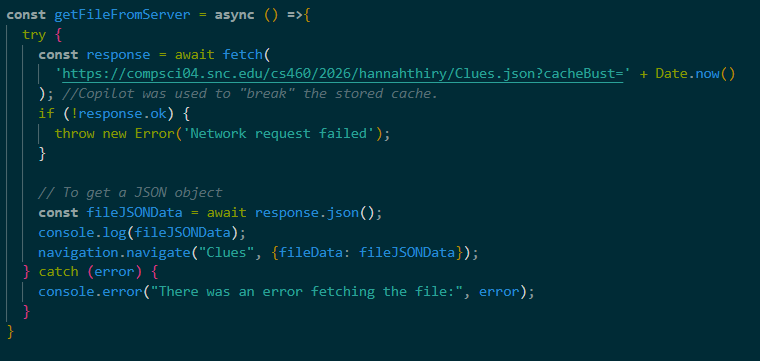
most recent scans rather than the oldest scans. This would help the lag that's there when a person moves around. We also discussed putting the clues into a file that would either live in the application
temporarily or on CompSci04. To our surprise a simple search gave us this answer and we implemented it together. Through the use of a Google search and the Gemini assistant, we were able to find the piece of code below
to be quite effective. The last thing we discussed were some goals to achieve:
Goal 1: Connect the JSON data to the Clues Array (Currently only being read and outputted to Console)
Goal 2: Change average RSSI to be a weighted average instead of a straight average
Goal 3: Get the user's current location this is for GPS mapping and guidance when the beacon is simply too far from the user to scan for
Goal 4: Write a file back to CompSci04. This would be to prepare for the helper application
Goal 5: Change app's theme to be uniquely mine
I have already done goal #1 this week, and I started to try to implement goal #3, but ran into some difficulties with errors so for now I will pivot and try goal #2 this coming week. I am hoping to do all the rest of these goals
by the end of spring break. I will have some time in the car to work as well as some time to think without getting distracted with other classes.
Week 5 - 03/02/2026: Distance to Beacons
Updated on 03/09/2026
This week I had a lot of exams in other classes, so I didn't have as much time as I thought I would have to work on this project. However, I was still able to make some progress with the main app and drafting
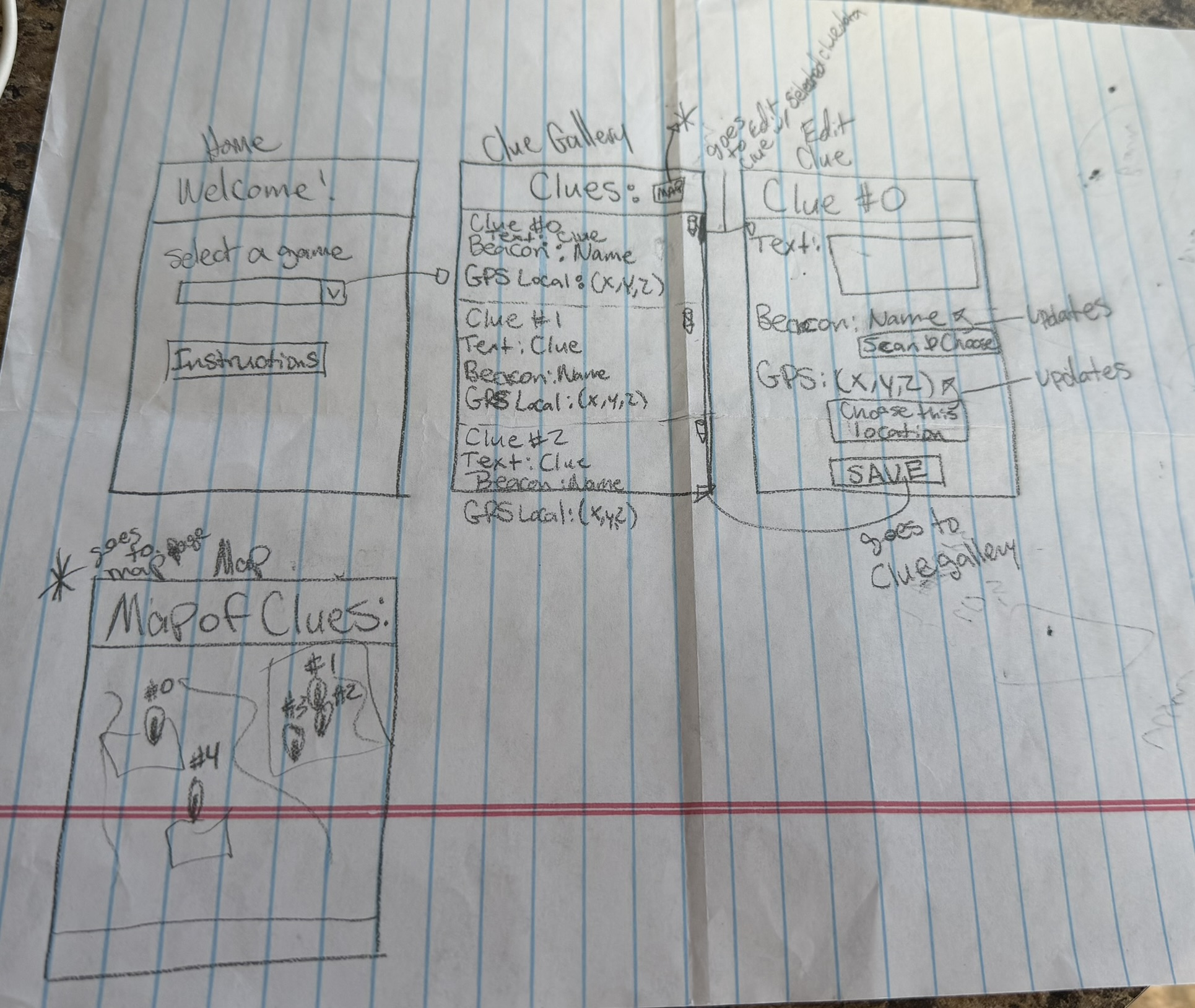
up an UI for the helper app. Sadly, I haven't implemented a helper application quite yet, but this week I drew out on paper what I'd like it to look like (Fig. 1). I have around 3-4 pages depending on if I do a
map page where a user of the helper app can see where the beacons are. The other pages are a Home screen, a screen that shows all the clues for a certain game, and a clue editing page. Once I get further along in
the main application and have more information on what the clues contain and GPS, I will start implementing this application.
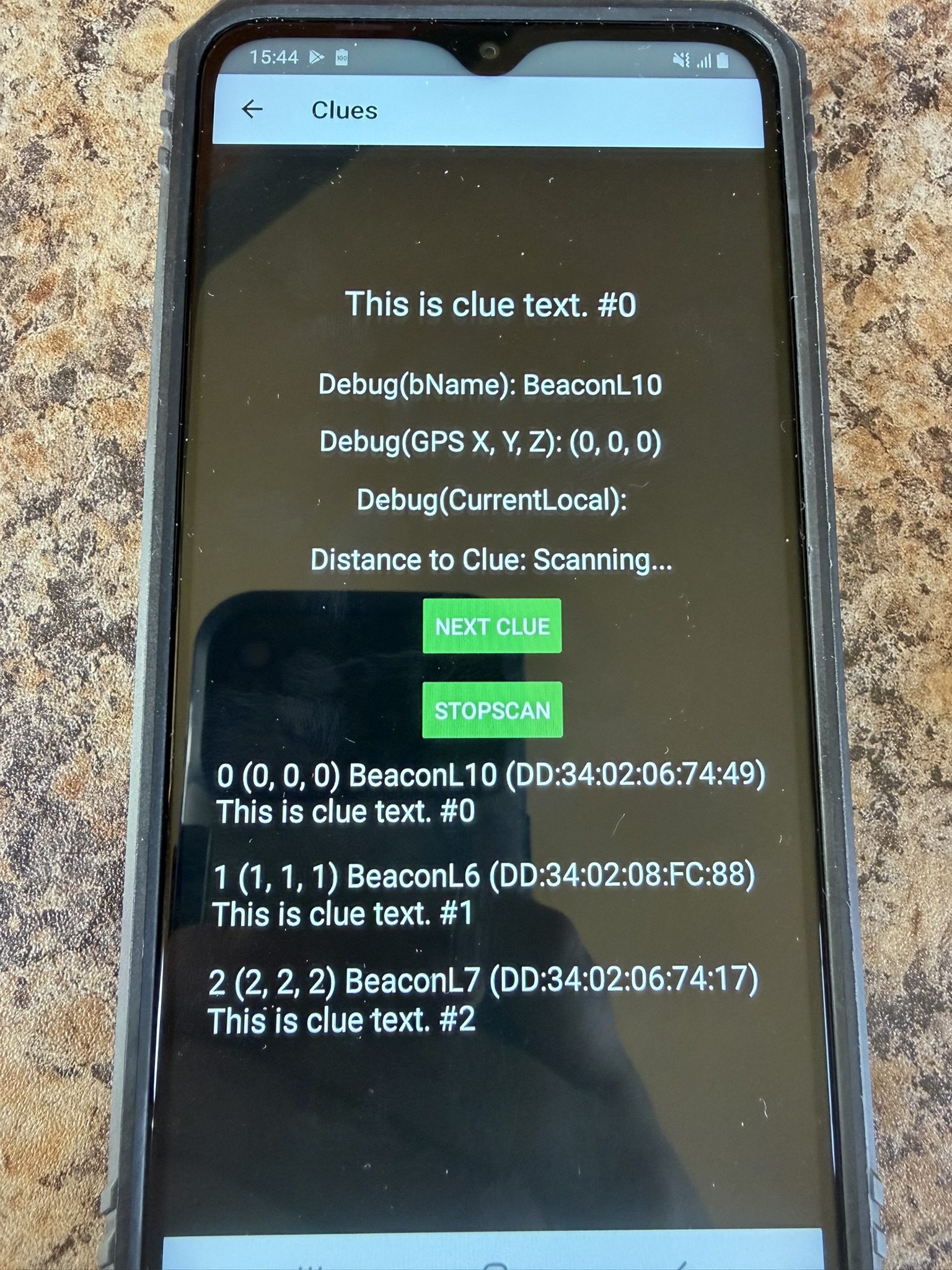
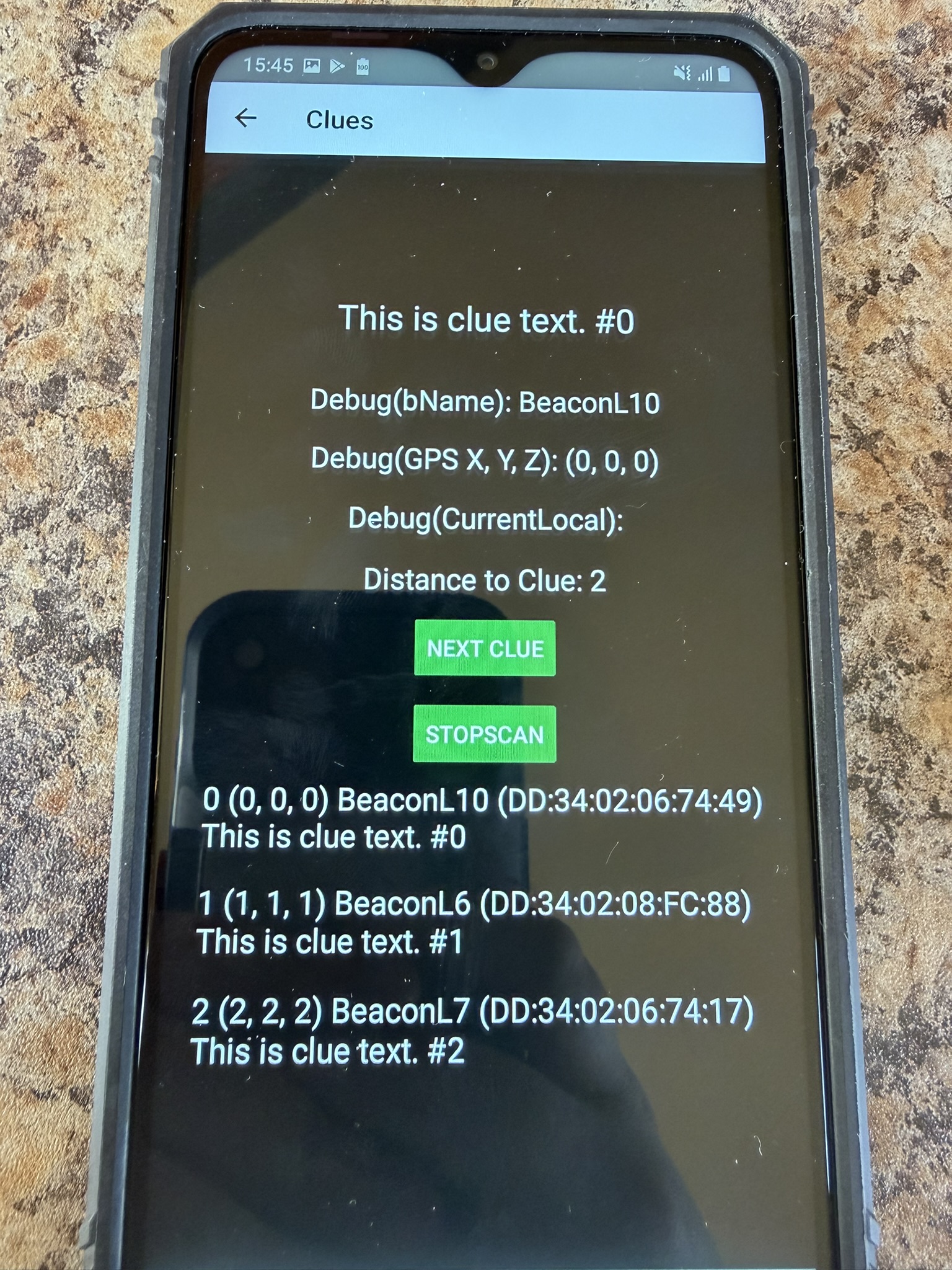
The next improvement I made this week is getting the distance for a singular beacon. I was able to change the scan to find only the beacon I needed. This was the beacon tied to the current clue displayed; although,
I started with a manual entry of a beacon name. This was a success! Once I filtered by which beacon I needed, I set about gaining the distance for only that beacon. I did this by referencing Elliot's capstone
project and taking a few functions he had that calculated the distance from the beacon's RSSI. I don't ever connect to the beacon, I only scan for it and get the RSSI that way. This works for the most part, but may
need to change in the future to improve accuracy and speed getting that data. After this was able to work for one beacon, I made it dynamic based on the clue that was displayed. So I can loop through each clue and
see a different distance based on that clue's beacon RSSI signal. I was able to test a bit with going further away and closer from the beacons as well. This works for the most part, except that sometimes it gives outlier
numbers. It also does this when the phone stays is in the same place.
Week 4 - 02/22/2026: Ready, Set, Go!
Updated on 03/02/2026
This week I hit a huge breakthrough! I was able to scan for the bluetooth beacons using Elliot's 2024 project! It turns out the problem was not the code at all, but the phone I was using.
For now, I will continue using the phone that works, but eventually I will need to figure out why the other phone was unable to scan for the beacons.
With this new progress, I started to implement the UI of the application, using all the information I talked about in weeks two and three from the Mini Poster Sessions and talking with Dr. McVey.
For now, I will start out using Elliot's layout, but will move to my own styling once the functionality of the application works. I started out with a screen that displayed only static information.
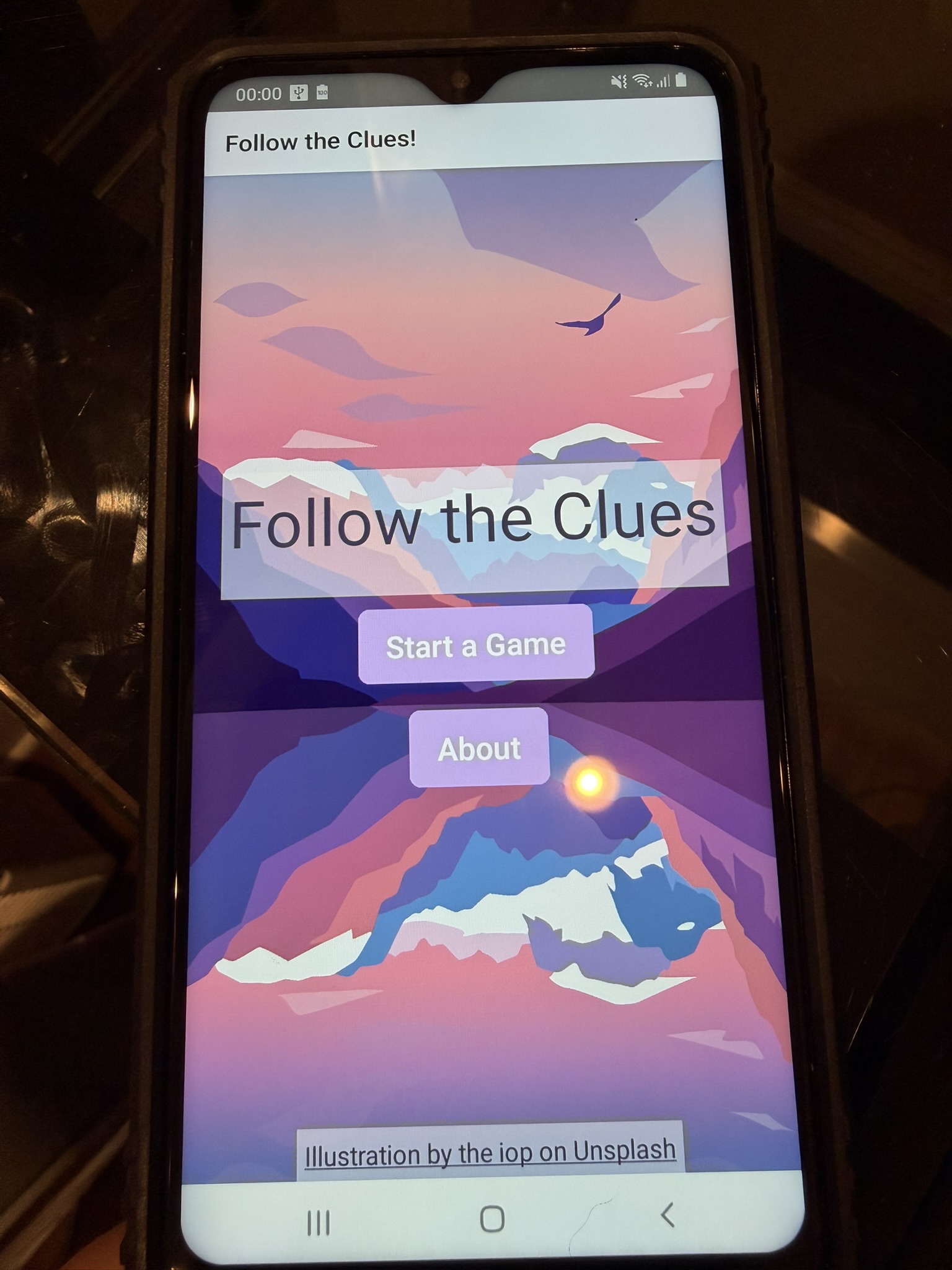
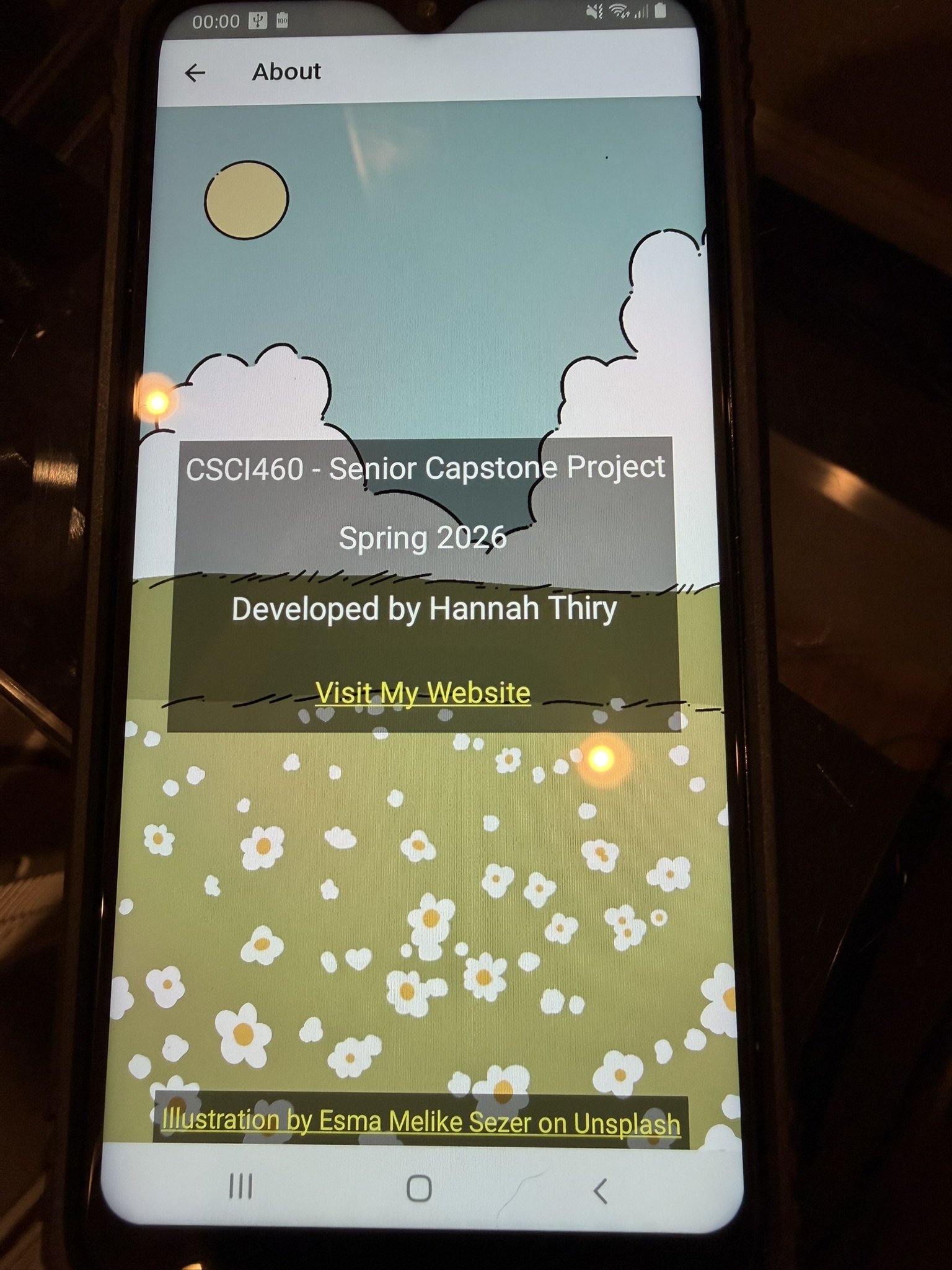
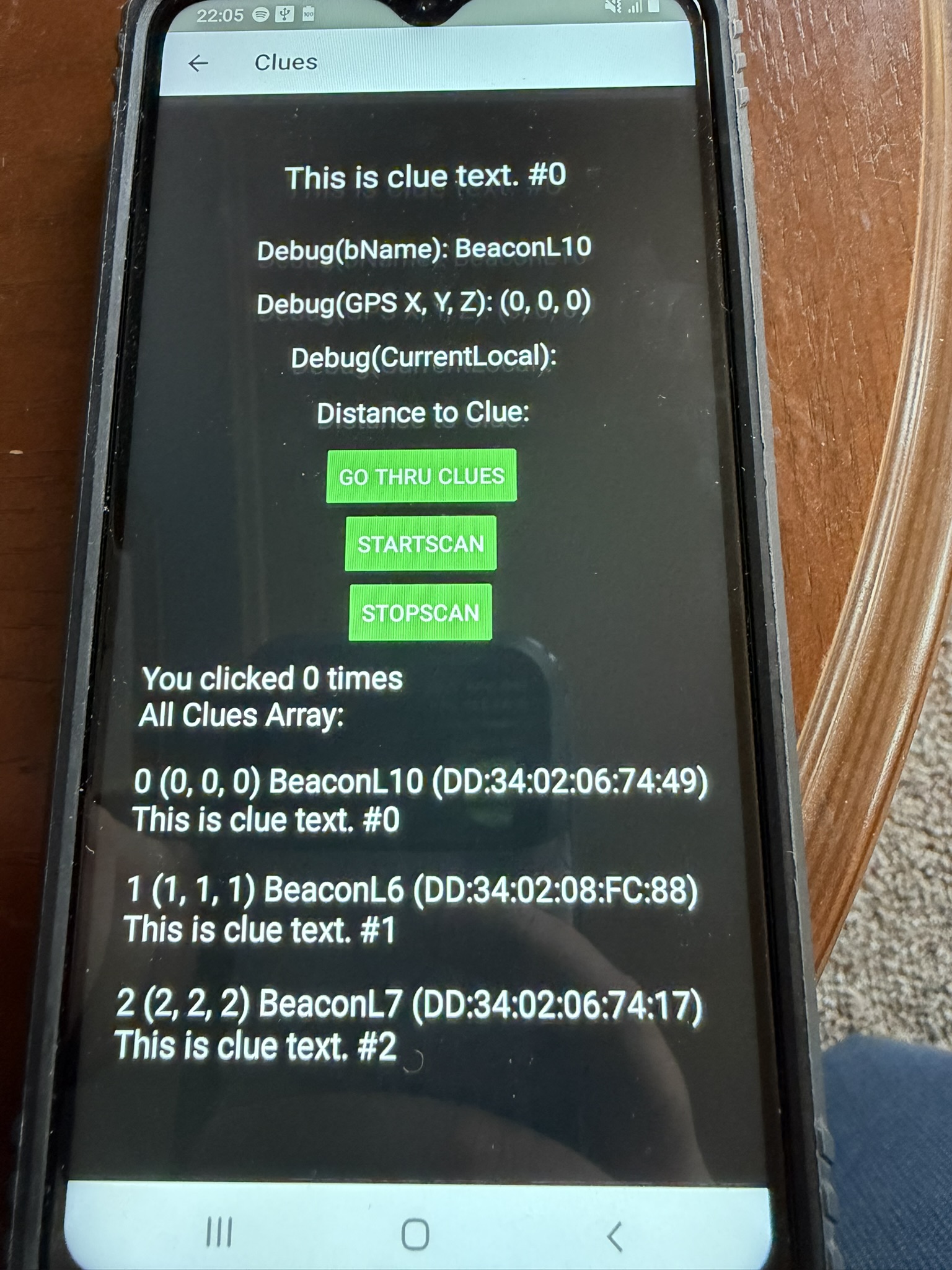
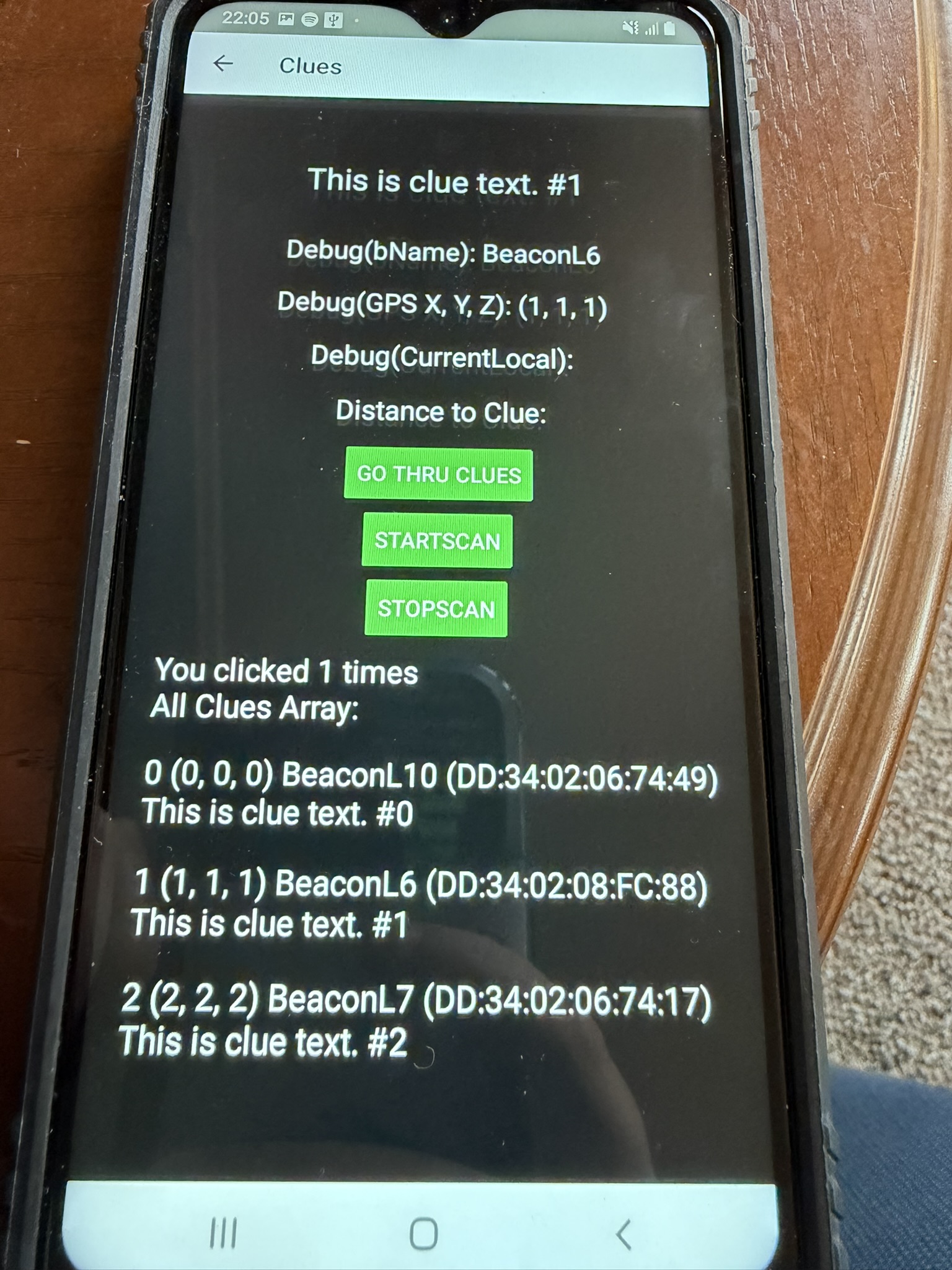
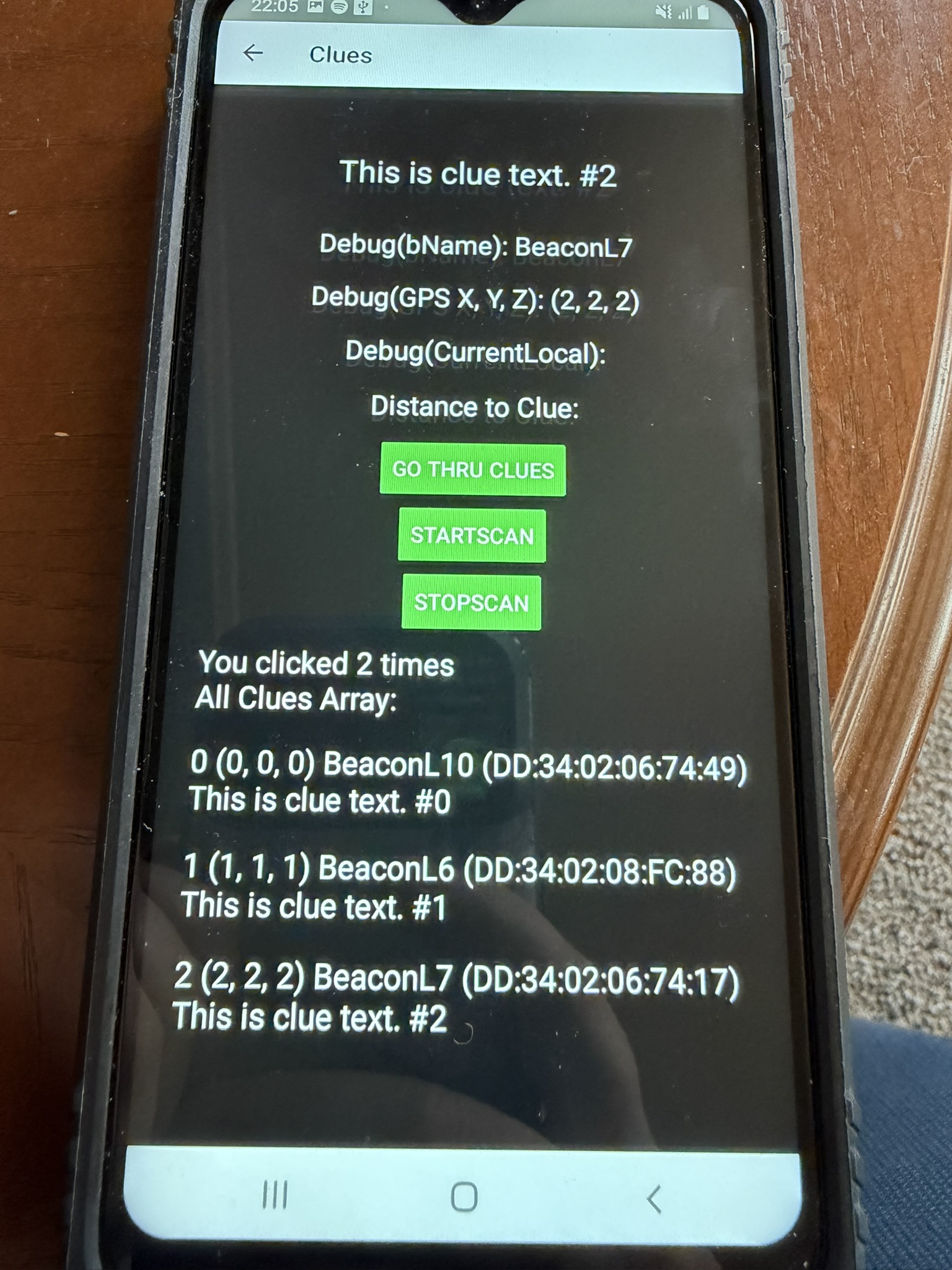
So I had a home page with two buttons: Start a Game, and About. "Start a Game" goes to the Clue page. The "About" button goes to a page detailing the application and giving a link to my website. The
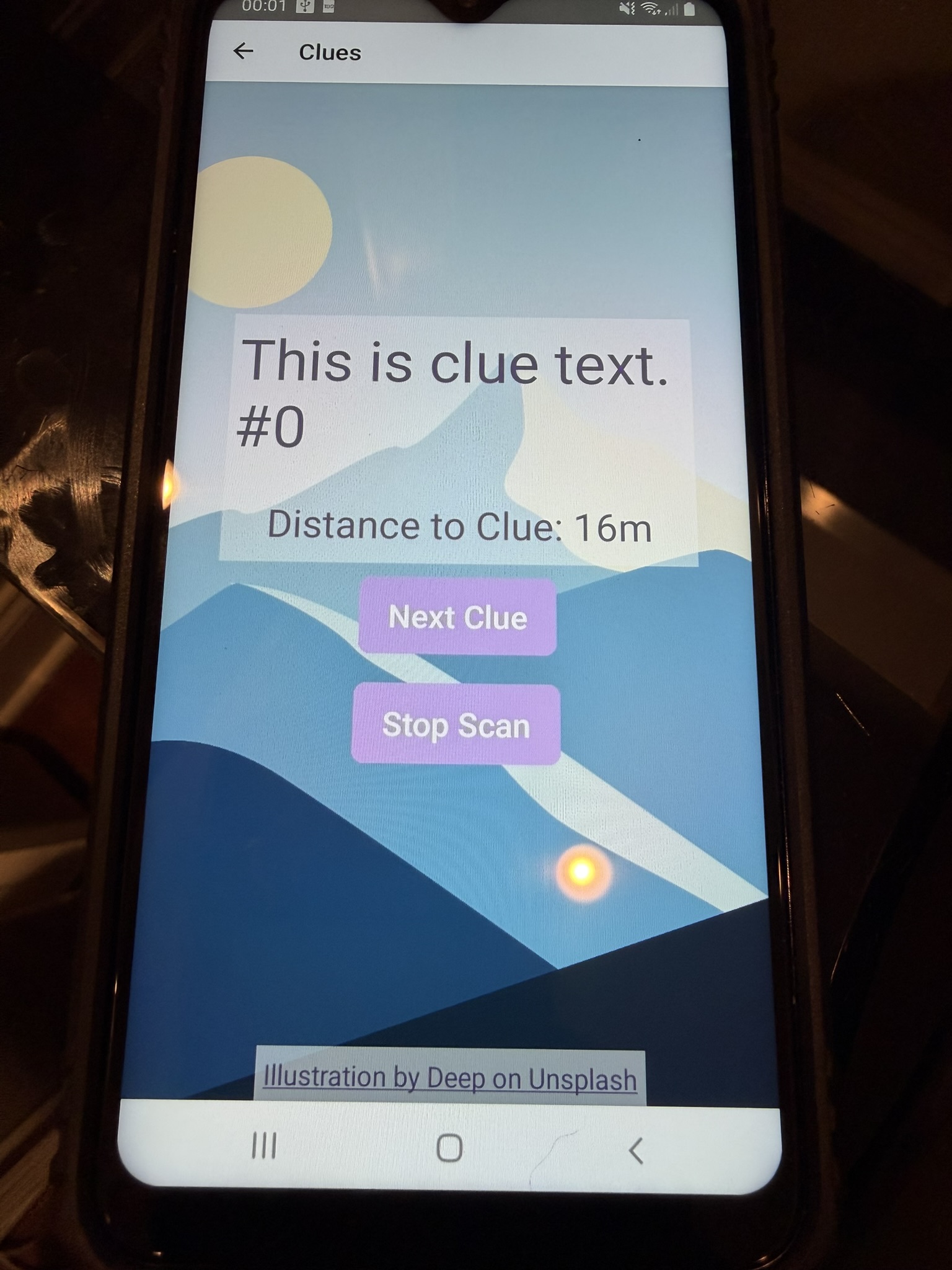
Clue page had a placeholder for where the clue text would go and three debug placeholders for me as I test. The three debug texts will be the Beacon ID/Name, the registered GPS coordinates of the Beacon,
and the current location (GPS Coordinates) of the user. This screen will also show the distance from the clue from where the user is currently. Once I had a screen that had static elements, I started to
implement a clues array. I used the React Native documentation for this as it seems quite a bit different than what I am used to in C++ or C#.
I added three test clues into the array, and added a button to loop through them as well as a count label. The counter only goes 0, 1, 2, repeat. I also have a display of all the clues underneath the buttons, for now.
I have this so I could keep track of the clues array as I was getting it to loop through. Then since I was able to get the clues to work, I started working on a basic scan. I prompted Copilot to create a simple bluetooth
scanner that would scan all BLE objects around me. This worked wonderfully, so I added an if statement to only display text in the console if it was a beacon. I also added the Android permissions that Elliot had in his project in
order for the scan to work. At first I had this on another screen that once I clicked a button, it would go to and run the scan. This was to test functionality at first. Then I integrated it into the Clue page and added
a button that started the scan. I also added a button to stop the scan as well. So this week, I accomplished having a simple UI for my application, am able to scan for just general beacons, am able to loop through the clues,
and am able to stop the scan. Of course, none of this automatic yet, but I am lightyears closer to that goal than I was last week. As for my timetable, I still need to create a helper application to input the clues.
I was more focused on the main application this week, so I didn't start the UI for the helper app yet. I also focused more on bluetooth this week, so next week I will need to focus on starting the helper app, and starting
to get GPS locations from the user. I would also like to start grabbing clues from a database or at least think about how that may look like instead of having a static array within the code. A new step in bluetooth this
week I could work on if there's enough time is to connect a single beacon/grab it's RSSI data to determine how close a user is to it. I may not even need to connect the beacon to obtain it's RSSI.
Week 3 - 02/15/2026: Issues, Issues, and More Issues
Updated on 02/22/2026
This week I felt like I didn't get a lot physically done or at least have nothing to show for the work I put in. This is because of the endless errors I would get when compiling different programs
that have BLE in them. I started out this week looking into Expo with development build instead of Expo Go. I started using the Android devices I recieved
from Dr. McVey for this because it was easier to obtain Developer Options. It took little to no effort whereas for Apple I signed up to be a developer on the software, but it seemed like a long process, so I
stopped trying that for now. Due to using Expo with a development build instead of Expo Go, I decided to try this website again: BLE Expo Blog.
However, when I tried to run this person's program that I downloaded from GitHub, it errored out with a versioning error. This means it may be too old to run even though it's from 2024. However, the blog did provide some key details
on how BLE devices function. I learned that there is a peripheral and a mode within BLE and that those are the two things connecting to each other.
The other part to this week other than all the errors with different BLE programs is that there is a project from 2024 that seems similar to mine. I looked at the documentation for the project and followed all of the installation instructions.
The person who made the project, Elliot Ward, used React Native as well, but with no environment and only for Android. Following the documentation, I was able to run and compile the app he made; however, when the app scans for beacons I see a long
list of null named bluetooth devices, and the application times out after searching for 20 seconds. It didn't matter how many beacons were turned on, the result was the same. The idea is there though, so using his scan function, I will have to
identify the problem in order to connect at least one beacon to my phone through an application.
At the moment, it doesn't seem like I have hit a lot of success with this project, so Dr. McVey has suggested that I switch gears and make a UI for an outline
of an application. This way I can still be productive while trying to figure out why the bluetooth doesn't function the way I want it to. In truth, I should have been doing this anyway, but I wanted to have a solid idea for an environment before I got too comfy
building anything. Since I was able to build and compile Elliot's project, I will start out in bare React Native in tandem with Andriod Studio and will focus on one operating system at the moment. Once I understand more about React Native environments, I will
move the code to be where I decide it's best to be.
Week 2 - 02/08/2026: Starting Line and Mini Poster Sessions
Updated on 02/13/2026
This week I started to look at React Native instead of React because of the format I want to build my app in. I want it to be as close to a physical app as possible.
I started by looking at the implementation on the website for React Native and found that it was suggested to use Expo GO. I also liked that Expo GO was cross-platform between IOS and Android.
Not knowing what this was, I researched it a bit first by half-creating one of their tutorials. I was able to create a partial app by doing this and it gave me an idea of the
file structures and how the code works within Expo GO. Using this application, I was able to see this app on my phone as well as in a browser. However, when I started to investigate
how to incorporate Bluetooth or BLE into Expo GO, I ran into some issues. Any program that I was able to find online that dealt with BLE was from 2024, and wouldn't function correctly
on my phone or computer. It kept running something, but then stopping where the JavaScript started. This was largely frustrating as it seems that the software from 2 years ago should
hypothetically work. It could have been due to me not knowing the software well and just needing to have packages I wasn't aware of or it could be due to Expo GO releasing new software
in the past few years. I was unable to figure this bug out, so I need to pivot again and instead use a different environment from React Native. I haven't been able to test this out quite yet,
but I will begin to try this next week.
The other part to this week were the Mini-Poster Sessions my class and I had. The sessions were held in class and each person presented twice to three different people each time.
The sessions were helpful because it allowed people to learn about other projects and the technical details behind them, but also the presenter was able to gain insights into their project
from others that they were maybe not thinking about. For me, it was helpful to think through where I am going to store the data both my app and "helper" application will need in order to
communicate. I am thinking that the data will be stored somewhere on the CompSci04 server, so that both applications can communicate to the server and grab the information it needs.
It also allowed me to think through which pieces of data each Clue will have. In this case, it will hold an UUID, a GPS Coordinate (to help guide before BLE kicks in),
and the text of the clue. There may be some other elements to this, but the mini poster sessions encouraged me to find out what to store and where to store the data I will need to run both apps.
Week 1 - 02/02/2026: Basic Implementation
Updated on 02/04/2026
This week I started to use React and Node.js to create a "Hello world!" app. I was able to connect the different pieces together and was also able to connect my phone to the local instance on my pc. I did this by connecting them to the same wifi network and typing in the IP address before the port number on my phone's browser. My next steps will be to think throughly about what I want the user to do with the UI and a rough draft of what that may look like on the welcome screen. I also need to know quickly if the method I chose will allow me to connect and see the beacons with bluetooth. If this method doesn't work, I will pivot to use React Native instead.
Week 0 - 01/26/2026: Initial Research and New Website!
Updated on 02/04/2026
This week I was given my project and its requirements. I decided I wanted to work with React in order to make an application that connects to the beacons. My first steps were to research React and go through its documentation. I also needed to download some applications to connect to the computer science server and to make this website! During this week, I also needed to make a decision on where to create my website. I had two options: WordPress or from a html template. As you may have guessed, I decided to use the html template option.