Project Files
To run: Create a database on a MySQL 5.7.37 server and run the sql located in "Database SQL.txt" (found in the folder) to create the database schema. After it is created, enter in the connection string for the database in the Startup.cs file where it says "ENTERSTRINGHERE". Next, install dotnet core 6 on the target machine (Windows/Linux). If wanted, you can change the port the app runs on by changing the field "applicationUrl" port number, located in "Properties/launchSettings.json" (the default port is 3910). Lastly, to run the application through the command line, be in the "Parking API" folder and run the command "dotnet run".
What the code in each folder does - "Controllers": Each class contains methods which handle a specific API request. The class name is added to the base url ("http://compsci04.snc.edu:3910/api/") of the api. For example, if I were to want to make a GET request to the ParkingSpots class, the url will be "http://compsci04.snc.edu:3910/api/ParkingSpots". "DAL": The class in this folder contains the connection to the database by creating a context with Entity Framework. "Models": The objects which correspond to an entity in the database.
To use the user or admin source code in a Visual Studio solution, Visual Studio 2022 must be installed with the "Mobile development with .NET" addon. Create a new solution targeting Android (for the user app) or Windows (for the admin app) and add the corresponding files to the solution. For each application, the _client.BaseAddress field in "WebService/Requests.cs" needs to be changed to the ip address of the machine the API app is ran on. For example, if the api is run locally with the port number "1234", then the string should be "localhost:1234/api/".
What the code in each folder does - "Models": The objects which correspond to an entity in the database. "ViewModels": Each class contains the properties which bind to the Views (pages of the apps) and the logic when actions are made in a View. "Views": Each View contains a .xaml file which contains the UI for a specific page and a corresponding .xaml.cs file. which is initializes the ViewModel class and is able to handle events for that page. "WebService": This folder contains classes which correspond to a specific Controller for the API. The "Requests" class contains methods which correspond to specific HTTP requests and are used the web services.
Executables
Download the .apk file on an Android phone (version 21+) and run it. If it fails to install, on your phone go to Settings/Security and change the "Install from unknown sources" setting (the exact steps depend on the phones version).
Run the "Admin App Certificate" located in the folder. Click on "Install Certificate", select the store location "Local Machine", select "Place all certificates in the following store", press browse, select "Trusted Root Certification Authorities", press ok, press next, and lastly press finish to install the app's certificate. Next, install the app's dependencies by going into the "Dependencies" folder, select your processor type, and run+install all of the .appx files found in the chosen folder. Lastly, run+install the "Admin App Installer" located in the main folder.
Presentation
Diagrams
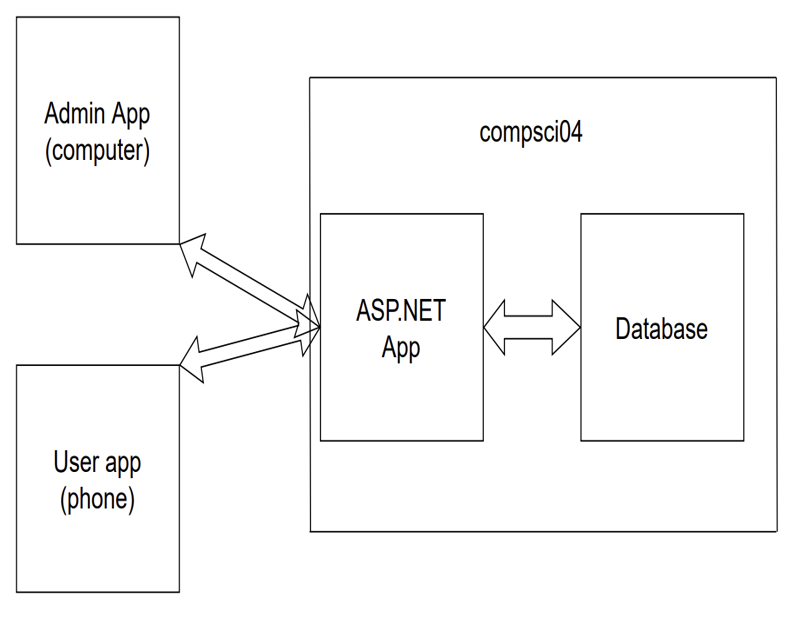
Data Flow
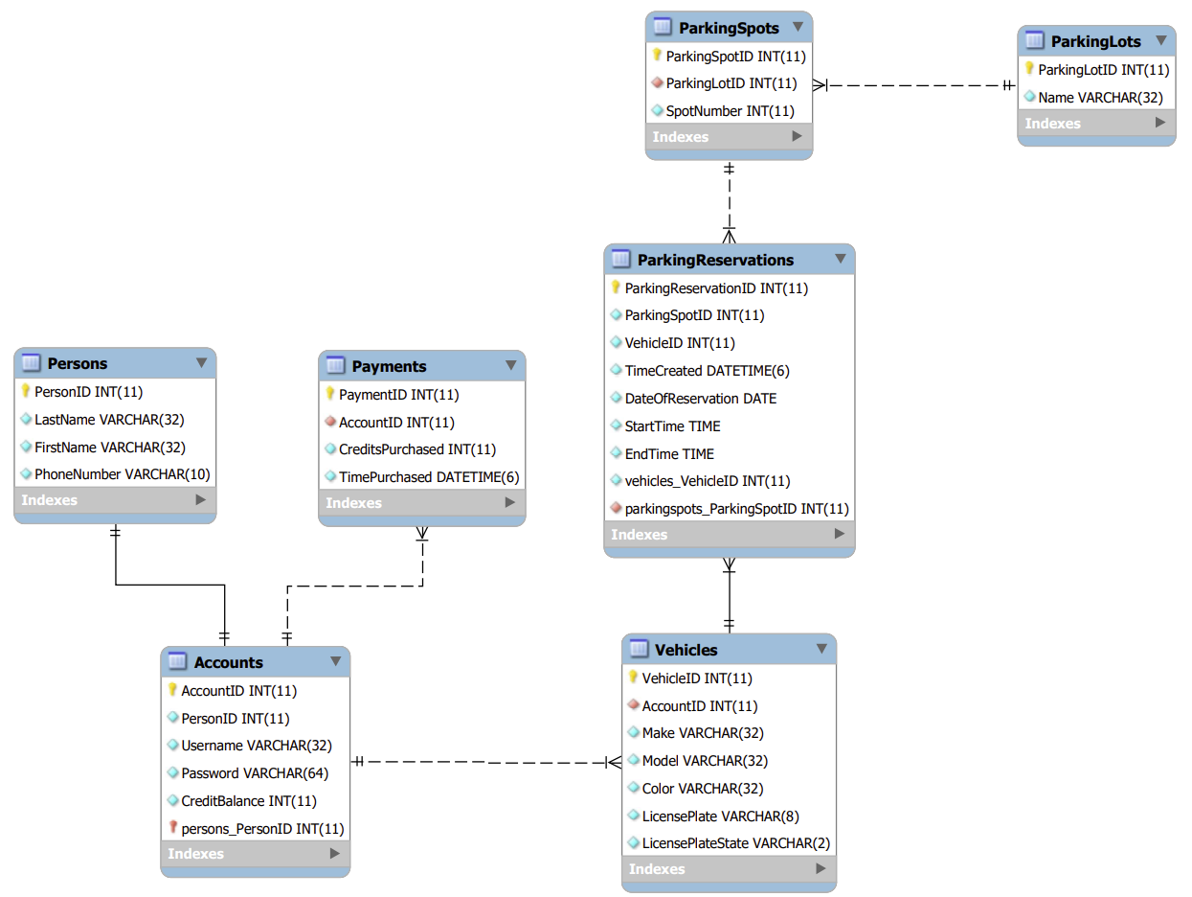
ER Diagram